
52% of surveyed trainers are already using AI for workout and program building, making it one of the top three applications of AI in the industry. That number tells you something: AI-assisted programming is no longer experimental. It’s a working part of how coaches operate.
This guide breaks down exactly how to use AI to build personalized workout programs, what client data you need, how to structure your inputs, and where your coaching judgment still does the work that AI cannot.
Key Takeaways
- AI handles program structure, volume, and progression logic while the coach provides judgment, safety checks, and personalization.
- Complete client data, including biometrics, goals, equipment, injuries, and training history, directly determines the quality of AI output.
- Building an AI-generated program follows five steps: collect data, input it, generate a base, customize progression, and apply coaching logic.
- Structured prompt frameworks like RACE and CREATE consistently produce more usable outputs than generic prompts.
- Early adoption data shows meaningful efficiency gains, with client outcome and business improvements growing as coaches build AI fluency.
Table of Contents
- What AI-Generated Workout Programming Actually Means
- 4 Benefits of Using AI for Personal Trainers
- Client Data You Need Before Using AI to Build Workout Programs
- Step-by-Step: Creating Personalized Workout Programs with AI
- Collect Client Assessment Data
- Input Data Into an AI Workout Builder
- Generate a Base Training Program
- Customize Volume, Split, and Progression
- Add Coaching Logic and Safety Checks
- Prompt Framework for AI Workout Programming
- How AI Personalizes Training Programs
- Best AI Tools for Creating Workout Programs
- 4 Common Mistakes When Using AI for Workout Programming
- FAQs
- The Future of AI in Personal Training
What AI-Generated Workout Programming Actually Means
AI-generated workout programming means using software to produce a structured training plan based on client data you provide. The AI handles the pattern recognition and output. You, as the coach, handle the judgment, meaning modifying it and choosing what to approve and deliver to your client.
This distinction matters because AI doesn’t have the entire context of your client. For example, it doesn’t know they might be stressed at work, have skipped sleep, or have a nagging left shoulder. It works with what you give it, which is exactly why you must (still!) stay in the loop at every stage.
The AI’s main job is to analyze your input: client data, but also goals, training phase, and even available equipment. Based on that, it inputs the entire workout for you, exercises, sets, reps, and progression logic.
Read More: AI in Fitness: The Complete Guide for Gym & Studio Operators in 2026
Best Practices for Using AI for Fitness Programming
Most fitness-specific AI runs on rule-based logic or machine learning models trained on exercise science and programming principles. That’s a meaningful difference from a general-purpose tool like ChatGPT.
ChatGPT can help you draft a program, but without precise prompting and an exercise science context built in, the output tends to be generic. It’s better suited for content, client emails, or marketing copy than for building periodized, client-specific training plans.
Purpose-built AI workout tools are trained on training methodology from the ground up. They understand progressive overload, movement patterns, and recovery variables by default, not because you engineered the right prompt.
🔦 Check Out: 30 ChatGPT Personal Trainer Prompts to Start Using Today
4 Benefits of Using AI for Personal Trainers
70% of personal trainers report that AI has improved their efficiency, with nearly a third calling that impact significant.
Here’s where personal trainers feel it most:
#1: Save hours on program design: AI generates a full training structure in minutes, freeing you to focus on coaching, communication, and retention.
#2: Scale to more clients without burnout: Personalized AI workout programming means you’re not rebuilding from scratch for every new client.
#3: Deliver more consistent personalization: AI applies your inputs systematically, reducing the risk of gaps in volume, progression, or exercise variety.
#4: Make smarter, data-informed decisions: Client performance data feeds back into the program, giving you clearer signals than memory alone.
🔦 Read More: All about AEO: ChatGPT Strategy for Personal Trainers
Client Data You Need Before Using AI to Build Workout Programs
The quality of your AI-generated program depends entirely on the quality of your inputs. Before you build, here’s what to have ready.
#1: Biometric and Demographic Basics
Start here. These are the foundations every AI tool needs before anything else:
- Age, sex, height, and current weight (within the last 3 months)
- Fitness level (beginner, intermediate, advanced)
- Primary goals (fat loss, muscle gain, strength, endurance)
#2: Fitness Goals and Training History
AI calibrates volume, intensity, and progression from recent training data. The best practice is to draw from the last 10 tracked workouts and cardio sessions in the past 90 days. This consistent client logging will directly improve the quality of output.
#3: Available Equipment and Schedule
As you well know, equipment availability and space limitations shape every exercise selection decision. Always document:
- Equipment access and training environment
- Target workout duration and weekly training frequency
- Preferred workout type (regular, circuit, interval)
- Focus area (upper body, lower body, full body, cardio)
- Specific muscles or movement patterns to emphasize
- Superset or circuit preferences and number of rounds
- Rest times between sets, exercises, or rounds
#4: Injuries, Mobility, and Limitations
This is where your coaching judgment is non-negotiable. Log any injuries, movement restrictions, and personal preferences (no running, longer rest periods, avoid overhead pressing) before generating anything.
A well-built AI will factor these in. Flagging them is always your job.
The more complete your client assessment data, the less editing you’ll do on the back end. That’s why it’s always important to have regular check-ins and a well-maintained client profile so every program stays accurate and current.
Step-by-Step: Creating Personalized Workout Programs with AI
Follow these steps consistently, and AI becomes a genuine force multiplier for your coaching business.
Step #1: Collect Client Assessment Data
Before you open any AI tool, your client profile needs to be complete. As mentioned, that means age, sex, height, current weight, fitness level, primary goals, equipment access, injury history, and personal preferences, all documented and up to date.
Step #2: Input Data Into an AI Workout Builder
Once your client data is ready, bring it into your AI tool of choice. Purpose-built platforms like the ABC Trainerize AI Workout Builder pull directly from your existing client profiles, so data you’ve already captured feeds straight into the generation process.
If you’re using a general-purpose LLM, you’ll need to input all relevant variables into a structured prompt manually. The more specific and complete your input, the more usable your output.
Step #3: Generate a Base Training Program
With your inputs in place, generate the base program. At this stage, treat the output as a strong first draft, not a finished product. The AI will return exercise selection, sets, reps, rest periods, and a training split based on the parameters you’ve provided.
Review it against what you know about your client before moving forward.
Step #4: Customize Volume, Split, and Progression
This is where your expertise shapes the program. Check that:
- Weekly volume is appropriate for the client’s recovery capacity and schedule
- The training split aligns with their goals and available training days
- Progressive overload is built in with realistic, client-appropriate increments
- Exercise selection matches their movement competency and equipment access
- Rest periods, supersets, and workout duration reflect their preferences
Adjust anything the AI got close but not quite right. This step is fast when your inputs are thorough.
Step #5: Add Coaching Logic and Safety Checks
Before the program goes to a client, run through a final check:
- Are there any contraindicated movements given their injury history?
- Does the program balance push, pull, and hinge patterns appropriately?
- Is the ramp-up realistic for their current fitness level?
- Does it account for lifestyle factors like stress, sleep, or schedule variability?
Your coaching judgment is the final filter, and it’s what your clients are paying for.
Want to Skip the Manual Setup Entirely?
The ABC Trainerize AI Workout Builder pulls your client’s profile data automatically, so you’re not re-entering anything. From there, the process is four steps: prompt, edit, save, and assign.
With access to a library of thousands of exercises and client data already built in, the heavy lifting is done before you even start. Coaches using it report saving up to 50% of the time they previously spent on program design, time that goes straight back into coaching.
See how our AI Workout Builder works here.
Prompt Framework for AI Workout Programming
The best prompts include the same variables covered in your client assessment: fitness level, goal, equipment, session duration, restrictions, and focus area. The more context you provide, the less editing you do afterward.
These two frameworks work particularly well for fitness programming.
AI Prompt for Workout Plan: RACE (Role, Action, Context, Execute) works best for single-session builds:
- Role: You are an expert personal trainer
- Action: Create a [duration]-minute [focus area] [workout type] session
- Context: [Sex] client, [age], [fitness level], [equipment access], [injuries or restrictions], training [X] days per week, Day [X]
- Execute: Include [compound lifts, supersets, finisher, etc.]. Avoid [contraindicated movements]. Rest [X] seconds between sets.
AI Prompt for Workout Plan: CREATE (Character, Request, Examples, Adjustments, Type, Extras) is better suited for full program design:
- Character: [Fitness level] [sex] client, [age], [primary goal]
- Request: Build a [X]-week [split type] program, [X] days per week, [X] minutes per session
- Examples: [Preferred training style, e.g., compound-first, circuit-based]
- Adjustments: [Injuries or movement restrictions]
- Type: [Regular / Circuit / Interval] with progressive overload built across all weeks
- Extras: [Equipment access and space limitations]
🔦 Free Resource: A Fitness Studio’s Guide to AI
Why Our ABC Trainerize Prompt Library Outperforms Anything You’d Write From Scratch?
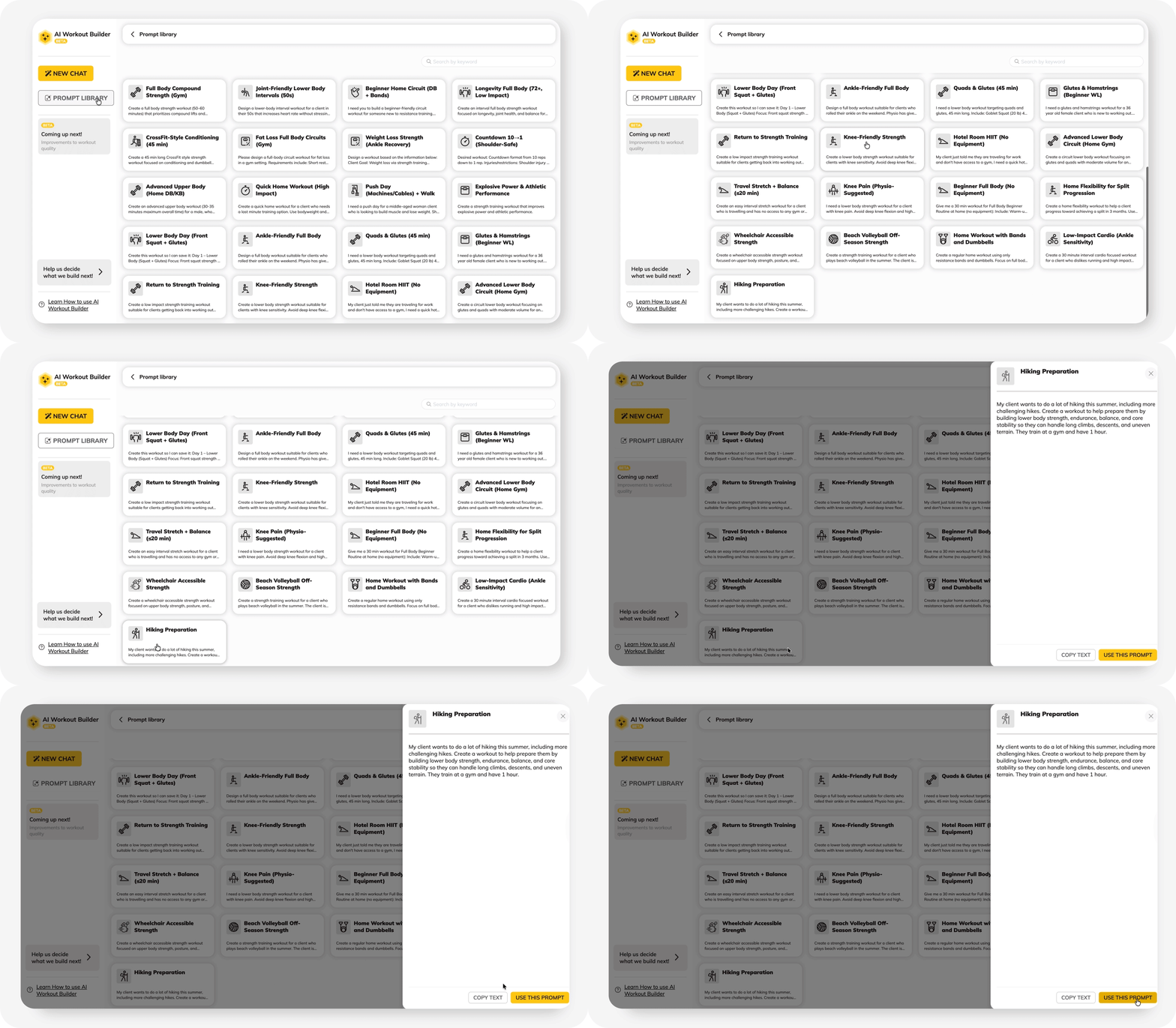
Building a precise prompt every time is a time cost in itself. Our AI Workout Builder solves this with a built-in prompt library and scenarios that cover Knee-Friendly Strength, Hotel Room HIIT, Wheelchair-Accessible Strength, and more. Each is already structured to pull data from your client’s existing profile.
How AI Personalizes Training Programs
AI-assisted programming isn’t just faster than manual design. When it’s set up correctly, it’s more consistent. Here’s what’s actually happening when the AI builds a program for your client.
- Exercise selection algorithms
When you input a client’s goals, equipment, fitness level, and restrictions, the AI cross-references those variables against its exercise database to filter movements that actually fit.
For example, a client with knee sensitivity won’t see deep knee flexion. A beginner won’t be handed a complex barbell variation in week one. You also get to edit on the go and stay in control.
- Progressive overload automation
AI applies progressive overload logic systematically for every client, every week, without you having to recalculate each one manually—volume, load, and intensity increase at a controlled rate based on the parameters you set.
For coaches managing 20, 30, or 50+ clients, this is where AI-assisted programming creates the biggest practical advantage. The principle doesn’t change. The time it takes to apply it does.
- Adaptive training based on feedback
The most capable AI tools don’t just build a program once. They adjust it based on what your client actually does: logged workouts, performance data, check-in responses, and cardio output.
For example, if a client consistently outperforms their loads, this signals to the AI tool that it’s time to progress faster. One who is struggling signals the opposite. The coach reads those signals. The AI updates the structure accordingly.
Best AI Tools for Creating Workout Programs
Not all AI tools are built for the same job. Here’s how the three main categories break down and where each fits into your workflow.
#1: AI Coaching Software for Trainers
Purpose-built coaching platforms are the strongest option for coaches managing real client rosters. They’re trained on exercise science principles, connect to client profile data, and are designed around how coaches actually work: building, delivering, tracking, and iterating on programs at scale.
Examples include: ABC Trainerize AI Workout Builder, Everfit, TrueCoach
#2: AI Prompting with LLMs
General-purpose tools like ChatGPT, Claude, and Gemini can produce solid program frameworks when prompted with precision. Using a structured framework like AIM, MAP, OCEAN, RACE, or CREATE, along with complete client variables, gives you a workable first draft.
The tradeoff is consistency and setup time. You’re responsible for every input, every time, and the output lives outside your coaching platform. LLMs are a practical add-on for ideation, content, and client communication, but for day-to-day programming at scale, they work best alongside a dedicated AI coaching platform, not instead of one.
#3: AI-Powered Fitness Apps
These are built for the end consumer, not the coach. Apps like Fitbod, JuggernautAI, and Zing Coach deliver adaptive, personalized programming directly to individual users based on their own logged data.
For a coach, they’re useful as a reference for exercise variety and programming structure. That’s where their value ends. They don’t give you a coaching dashboard, client management, or the ability to build and assign programs across a roster.
More importantly, your clients don’t need a separate app. A platform like ABC Trainerize already delivers AI-generated programs directly within a branded, client-facing app, keeping your coaching, your branding, and your client relationships in one place.
4 Common Mistakes When Using AI for Workout Programming
Relying on AI without coaching expertise
AI generates structure. You generate judgment. Review every output before it reaches a client. A program that looks complete can still be wrong for the person receiving it.
Ignoring client recovery and lifestyle
AI only factors in what you give it. If your intake doesn’t capture sleep, stress, and schedule, your program won’t account for them either. Recovery context belongs in the client profile, not as an afterthought.
Using generic prompts
Vague inputs produce vague programs. Fitness level, equipment, restrictions, session duration, and goal clarity all need to be in the prompt before you generate anything.
Skipping the safety check
No AI tool has eyes on your client. Movement contraindications, load appropriateness, and exercise sequencing all require a human review before the program goes live. The coach is always the final filter.
📺 Watch Now: How AI Is Changing the Personal Training Game
AI Workout Programs: FAQs
What does AI actually do in workout programming?
AI tools can analyze your client inputs, select appropriate exercises, set volume and intensity, and build progression logic across weeks. As a personal trainer, you can review, refine, and apply coaching judgment before the program reaches the client.
What data do you need before using AI?
Age, sex, height, weight, fitness level, goals, equipment, injuries, and recent training history. Complete inputs produce programs you can use with minimal editing.
How do you build a program with AI?
Five steps: collect client data, input it into your tool, generate a base program, customize volume and progression, then apply your coaching logic before it goes live.
What separates a good AI prompt from a bad one?
Specificity. Structured frameworks like RACE and CREATE consistently outperform generic prompts by incorporating the full client context into every input. Better yet, purpose-built tools like the ABC Trainerize AI Workout Builder outperform prompts by pulling client data automatically and applying structured prompt logic by default.
Is AI actually improving coaching outcomes?
For efficiency, yes, significantly. For client results and business growth, early data is positive, but results depend on how well coaches apply the tool.
More FAQs here.
The Future of AI in Personal Training
17% of coaches already report clear improvements in client outcomes since adopting AI, and 12% report measurable business improvements. Those numbers will grow as the tools mature and coaches get better at using them.
Here’s where the technology is heading:
- Real-time program adaptation. Programs that update automatically based on live session performance, not just weekly check-ins.
- Wearable data integration. Sleep scores, HRV, and recovery metrics feed directly into programming decisions.
- End-to-end coaching automation. Intake, programming, delivery, check-ins, and retention are all connected within a single AI-powered workflow.
The coaches building fluency with these tools now are the ones best positioned for what comes next. AI won’t replace great coaching. It will make coaching faster, more consistent, and more widely available than ever before.
The ABC Trainerize AI Workout Builder is built for exactly that. Start with us!