

As your fitness business grows, the role your app plays changes. It is no longer just where you deliver workouts, message clients, and manage programs. It becomes part of how clients experience your business, and a foundation for where you go next.
That is what the Trainerize Studio plan is built for.
The Studio plan gives growing fitness businesses one connected place to deliver their brand, build client relationships, and run what comes next. Let’s unpack what that looks like in practice!
Trainerize Pro vs. Studio Plans: What You’re Actually Getting With a Custom Branded App
#1 STUDIO IS NOT SIMPLY THE PRO APP WITH A FEW EXTRA FEATURES
The difference between Pro and Studio is not just the number of customizations or features available.
With Pro, you can create a polished branded experience for clients. With Studio, your app can become a more distinct extension of your business. One that carries your name, visual identity, and client experience more consistently from download to daily use.
What the Pro app gives you
The Pro Custom Branded App gives independent coaches a cost-effective way to bring their brand into the ABC Trainerize experience.
Clients can see your logo, welcome screen, mobile icon, and branded navigation. On Android, your business also receives a dedicated Google Play listing. On iOS, clients download the main ABC Trainerize Fitness App and see your branding once they sign in.
Setup is self-serve, with no included revision round. At $169 USD as a one-time fee, in addition to an eligible Pro subscription, it is a practical option for coaches who want a more professional client experience while keeping setup straightforward.
What changes with the ABC Trainerize Studio Plan
Studio is built for businesses that want their app to carry more of their brand and become a more recognisable front door to your entire business.
Your Studio Custom Branded App includes:
- A custom app name and icon
- A dedicated Apple App Store listing through your business’s Apple Developer Account
- A dedicated Google Play listing
- A themed in-app interface and branded navigation
- Custom shortcuts and links
- A collaborative build process
- One included revision round
That matters when your brand is beginning to drive demand:
- ⭐ Clients can refer friends to a brand they recognise
- ⭐ You can build a consistent studio identity across locations
- ⭐ Your digital experience can match your physical one
The Studio Custom Branded App is included with an eligible Studio subscription. Your business will still need an Apple Developer Organization account, which costs $99 USD per year.
Before you plan your app: To publish a Studio app, your business must be recognized by Apple as a legal entity and have a D‑U‑N‑S number.
Check Out: One Platform To Run And Grow Your Coaching Business
#2 GROWTH TOOLS THAT HELP EACH CLIENT RELATIONSHIP GO FURTHER
Studio includes the Business add-on, bringing referrals, bookings, announcements, and sales tools into the same place as your coaching.
Pro users can purchase these tools separately; Studio bundles them into the wider business setup.
Client referrals
With one tap, clients can share a prepared message and link with a friend. Send them to:
- A paid program
- A booking page
- A membership offer
- A challenge
- Any business URL
Referrals convert 40% higher than other acquisition channels, and referred clients have around 30% higher lifetime value. Built-in tracking shows who referred each prospect, so you can reward the clients driving growth.
Announcements
With the Trainerize Studio plan, you can use in-app banners and push notifications to put a new offer, challenge, service, or time-sensitive update in front of active clients.
Relevance beats volume. Contextual push notifications achieved a 14.4% average open rate, compared with 4.19% for generic campaigns. Use them to prompt a meaningful next step—not add noise.
Read More: Introducing ABC Trainerize Business: A Smarter Way to Scale Your Coaching Business
#3 API ACCESS: THE CAPABILITY PRO CANNOT ADD LATER
API access is Studio’s most technical differentiator. While Pro users can add features as their business grows, they cannot add API access.
An API lets Trainerize exchange data with the other systems your business uses. That is increasingly useful as studios connect CRMs, reporting tools, payment workflows, and AI-assisted automations—without replacing the systems already in place.
It does require technical confidence or a developer who understands APIs, endpoints, and webhooks. But it gives your business the flexibility to build around how it actually operates.
With API access, Studio can provide:
- A connected client record across Trainerize, your CRM, and other business tools.
- A clearer view of engagement by bringing key client activity into one reporting dashboard.
- More flexible workflows when standard integrations cannot do what your business needs.
The result is less manual admin between systems and more control as your operations become more complex.
Free Resource: A Complete Guide to Purchasing Your Custom Branded Fitness App
The Studio App-Building Process: From Purchase to Launch
- Sign up for an eligible Studio plan.
- Meet the requirements such as having a registered business, D‑U‑N‑S number, business website, email, and other required information.
- Set up your Apple Developer Account as an organization.
- Add Trainerize as an admin to your Apple Developer Account.
- Submit your materials, such as business details, app name, logos, images, and other brand assets.
- Review and revise with one included round of changes.
- Build your custom branded app and prepare its store listings.
- Approve and launch under your business name.
After launch, ABC Trainerize continues handling software updates, bug fixes, support, and compliance.
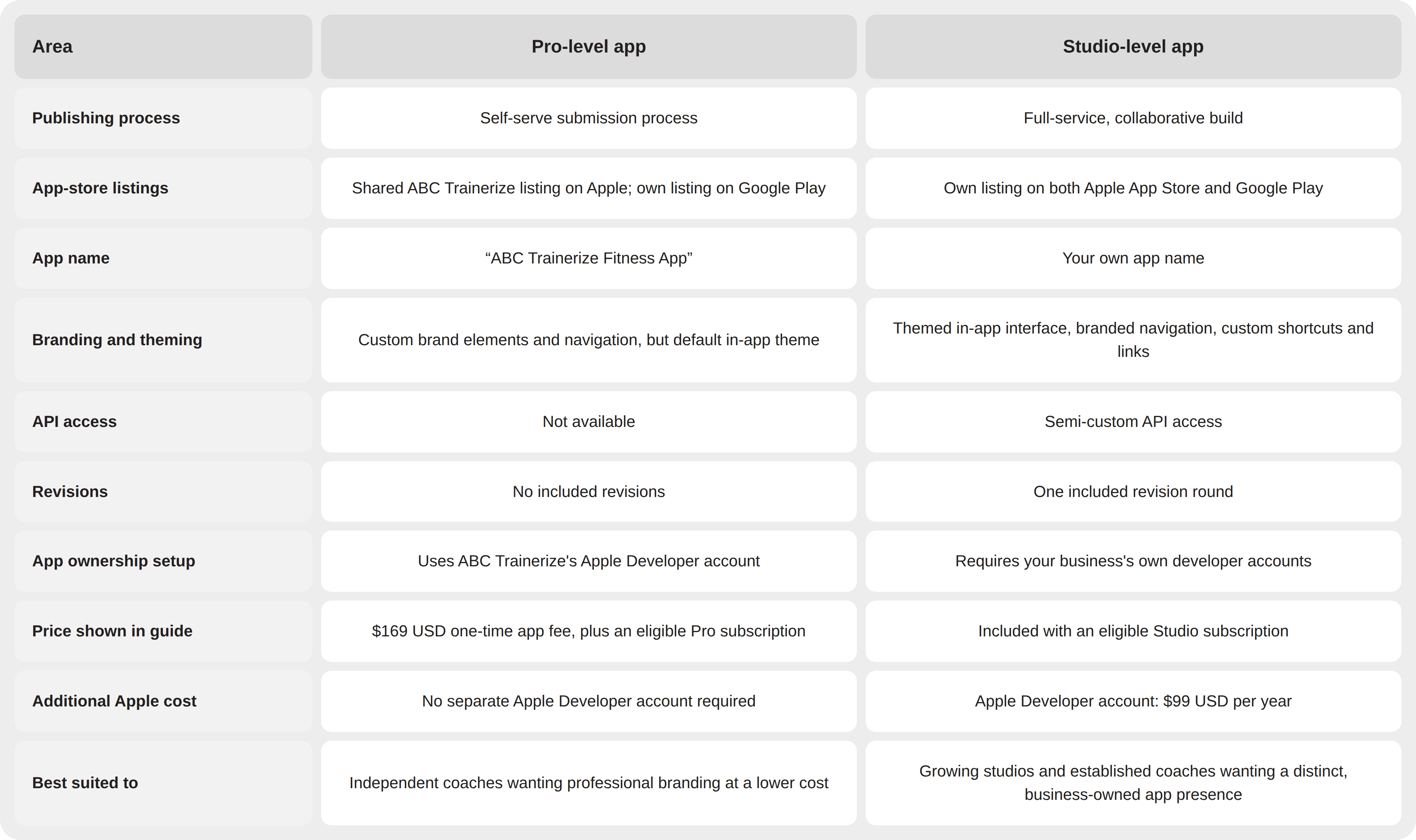
ABC Trainerize Pro vs. Studio Plans at a Glance
Free Resource: A Complete Guide to Purchasing Your Custom Branded Fitness App
FAQs
- Can I add extra trainers to my Trainerize account?
Yes. Paid Trainerize plans let you add multiple trainers, each with their own clients, while owners and managers oversee the team through centralized tools and role-based permissions.
- How does Trainerize pricing scale as my coaching business grows?
Trainerize offers flexible pricing that grows with your business. Choose the plan that fits your current business, then upgrade as your client base or team grows. Studio plans are designed for growing fitness businesses that need team management and more tools in one place.
- Is Trainerize a good value for growing fitness businesses and studios?
Yes. Trainerize is designed to grow alongside your business, whether you’re an independent coach or managing a team of trainers. As your studio expands, you can move to a Studio plan that brings team management, Business features, a Custom Branded App, and API access into one plan.
If you already use several add-ons, upgrading to a Studio plan can also be more cost-effective than paying for multiple add-ons separately.
- Can multiple trainers manage their own clients while I oversee everything?
Yes. Trainers can manage their own clients while owners and managers oversee the full team from one dashboard. Role-based permissions help control access as your business grows.
Is ABC Trainerize Studio Plan the Right Fit for Your Business?
Not sure whether Studio makes sense for where your business is today? Talk with our team for a straightforward, no-pressure look at your setup, goals, and next best step.
Button: Talk With Our Team