
If you’re still building programs in Google Docs or Excel, you’re likely spending hours formatting workouts, emailing a PDF that clients lose track of, and then eventually losing track of whether anyone actually did the work.
A workout builder software lets you create, customize, and deliver programs, with exercise libraries, video demonstrations, progress tracking, and automated delivery built right in. Having one saves you hours every week and allows you to deliver a more professional client experience.
Here’s a breakdown of the top platforms out there to help you find the best fit for your clients.
Key Takeaways
- Workout builder software replaces manual programs with a digital platform that delivers workouts, tracks progress, and scales to your client’s load.
- Solo online coaches, gym owners, and performance coaches all have different needs. The best platform depends on your coaching style.
- ABC Trainerize is the only all-in-one platform on this list that combines AI workout building, nutrition coaching, habit tracking, and business management in a single app.
The Importance of Workout Planning Software
We like to think of workout planning software as your behind-the-scenes coach. It’s not just about saving time (though that’s a huge plus); it’s about staying consistent, getting personal, and making sure each client feels like they have the perfect tailor-made program for them.
Check Out: Continuing Professional Development for Personal Trainers
Not to mention that it ups your game and frees you from juggling spreadsheets or digging through PDFs. Instead, it’s just pure, streamlined magic that you and your clients will love.
Pssst. ABC Trainerize can help you with all that.
👉 Free Resource: Personal Trainer Software Tools Cheat Sheet
How We Evaluated These Workout Builder Platforms
We assessed each platform against criteria that working personal trainers actually care about. Here’s what we looked at:
- Core Workout Building Features: Does the platform provide the tools to build any program style? We looked for drag-and-drop editors, superset and circuit builders, training block support, and progressive overload tracking.
- Client-Facing Experience: A program is only as good as how clearly clients can follow it. We evaluated mobile app quality, video demonstrations, workout view clarity, and the ease of logging results for clients.
- AI and Automation Capabilities: AI workout builders and automated program delivery significantly reduce admin time. We noted which platforms offer these tools and how they perform in practice.
- Integration with the Broader Coaching Business: The best platforms go beyond workouts. We looked at nutrition coaching, habit tracking, payments, scheduling, and whether the platform can genuinely replace multiple tools.
Best Workout Builder Software for Personal Trainers: At a Glance
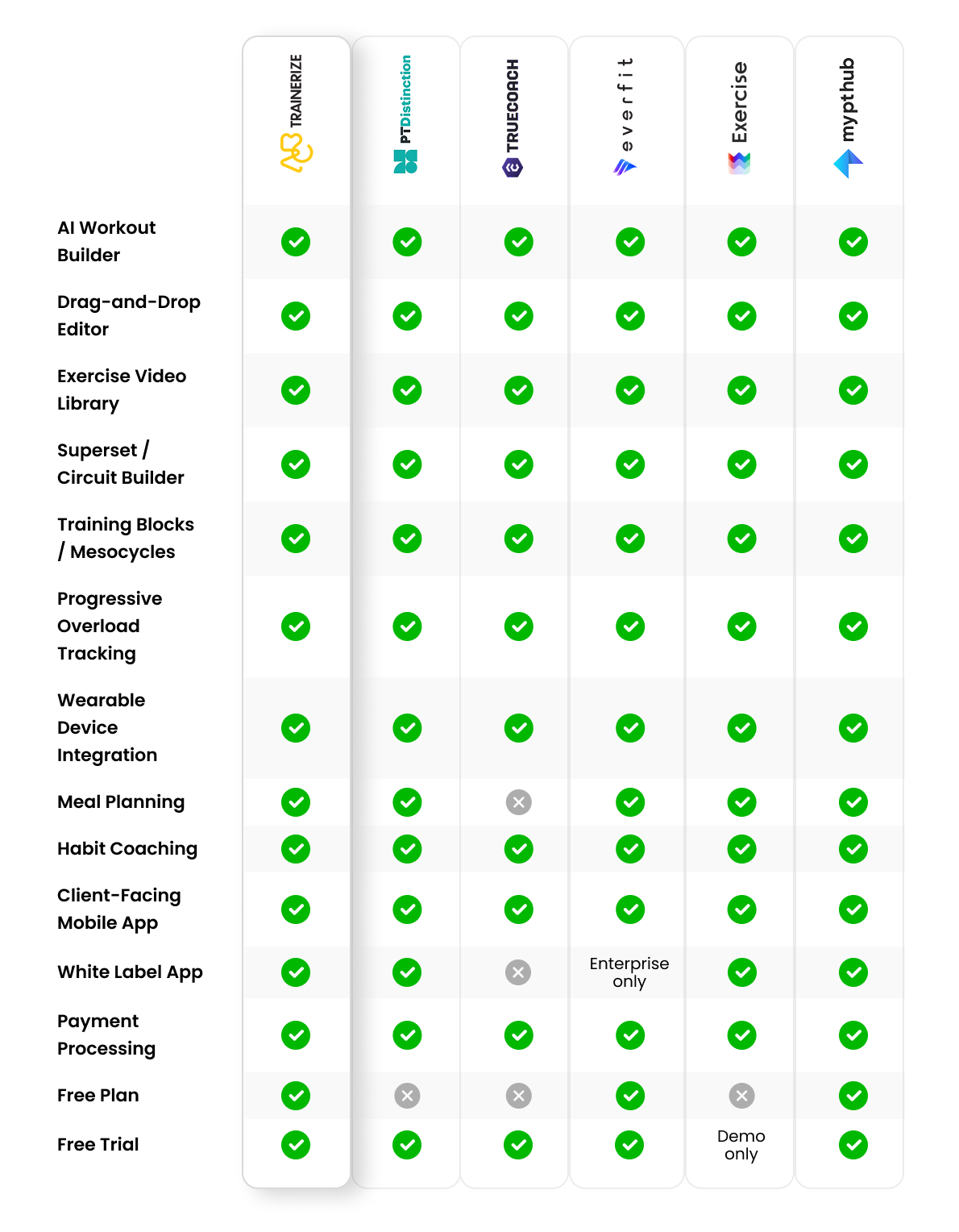
Before we get into the details, here’s a quick feature comparison for each workout builder software we evaluated:
With those criteria in mind, here’s how the leading platforms stack up. Click here to view the table in full-screen.
Top Workout Builder Software
So, let’s look at some all-star software options that can make building workout plans feel like a breeze. Whether you’re looking for power-packed features or just want to make your life easier, these tools have got your back.
1. ABC Trainerize
Let’s start with our (admittedly biased) personal favorite, ABC Trainerize.
Our easy-to-use software helps you offer custom programming to every single client—whether online, in-person, or hybrid. Plus your clients can track their progress, receive ongoing support and motivation, and ultimately crush their fitness goals.
Key Features
- AI Workout Builder: Generates ready-to-assign programs based on client goals, equipment, and training style
- Exercise library: 1,000+ movements with video demonstrations and custom upload support
- Drag-and-drop editor: Builds multi-week phased programs using reusable training blocks
- Superset and circuit builder: Supports superset, circuit, and EMOM-style workouts with full rep and rest control
- Progressive overload tracking: Logs volume, load, and intensity set by set across weeks
- Automated delivery: Sends programs to new clients automatically on a set schedule
- Periodization tools: Organize training into blocks, phases, and mesocycles with built-in frameworks
- Bulk duplication: Duplicates programs across multiple clients at once for faster onboarding
- Wearable integration: Connects with Apple Watch, Garmin, Fitbit, Withings, and MyFitnessPal
- All-in-one platform: Combines workouts, nutrition, habits, payments, and a branded app in a single app
Pros
- The AI Workout Builder cuts programming time more than any other tool on this list
- Workouts, nutrition, habits, payments, and branding all live in one app
- The client-facing mobile app has video demos and live progress tracking built in
- It scales from solo coaches all the way up to multi-location studios and enterprise gyms
Cons
- The feature depth takes time to learn, so it can feel like a lot for brand-new coaches
- Full white-label branding requires the Pro Custom Branded App add-on ($169 one-time) or Studio plan
Pricing (monthly billing)
Free plan: 1 client. Grow: $10/month (2 clients). Pro 5: $22/month (5 clients). Studio plans start at $250/month and include all add-ons.
Best for
Online coaches and gym owners who manage multiple clients and want one platform for programming, nutrition, client engagement, and business growth.
You can view all of ABC Trainerize’s cutting-edge features here!
2. PT Distinction
PT Distinction is a fantastic tool that helps trainers build deep, detailed workouts and nutrition plans. With its drag-and-drop builder and exercise library, you can whip up plans quickly while keeping them personalized. Plus, it’s super handy for tracking client progress and adjusting as they level up!
Key Features
- Workout builder: Drag-and-drop design with coaching cue fields and a detailed exercise library
- All features included: Nutrition, habits, and automations come standard on every paid plan; no add-on fees
- Custom-branded app: White-label iOS and Android branding available on Pro and Master plans
- Automation: Schedules program delivery, check-ins, and client messages automatically
- Progress tracking: Custom assessment templates, check-in forms, and body metric logs for every client
Pros
- All features come included on every plan with no hidden add-ons
- Strong automation for program delivery and client communication
- Highly customizable program design with detailed coaching cue support
Cons
- Per-client pricing adds up quickly for coaches with rosters above 25 clients
- Custom-branded apps are only available on Pro and Master plans, not Novice
- Some users report that the mobile app search function feels limited
Pricing (monthly billing)
Basic: $19.90/month (3 clients; extra clients at $6/month). Pro: $59.90/month (25 clients; extra at $2.40/month). Master: $89.90/month (50 clients; extra at $1.60/month). 1-month free trial available on all plans.
Best for
Coaches who want deep customization and every feature included without paying for add-ons, especially those with smaller, high-touch client rosters.
Check Out: Must-Listen Personal Trainer Podcasts for Professional Growth
3. TrueCoach
TrueCoach’s simple interface means no learning curve required. Build personalized programs that clients can access anytime, anywhere. TrueCoach’s template options make it easy to customize workouts and keep communication flowing, so clients stay motivated and you stay in the loop.
Key Features
- Exercise library: 3,000+ professionally recorded videos that auto-link as you type exercise names
- Program Builder: Saves reusable workout series and supports multi-week training blocks
- Client dashboard: Single-screen view of completions, compliance, feedback, and messages
- Payments: Stripe recurring billing and session packs are included at no extra cost on Standard and Pro plans
- Wearable integration: Connects with Apple Health, Garmin, OURA, WHOOP, Fitbit, and Polar; available on Standard and Pro plans only
Pros
- Clean, intuitive interface with almost no learning curve
- 3,000+ professionally recorded exercise videos with smart auto-linking
- Automated Stripe payments are included on Standard and Pro plans at no extra cost
Cons
- Wearables integration is not available on the Starter plan
- Limited automation compared to platforms like ABC Trainerize or PT Distinction
- Pricing scales steeply at higher client tiers
Pricing (monthly billing)
Starter: $29.98/month (up to 5 clients). Standard: $69.98/month (up to 20 clients). Pro: $164.98/month (up to 50 clients). More than 50 clients require a custom quote. 14-day free trial available, no credit card required.
Best for
1:1 coaches and hybrid trainers who want a clean, reliable platform with a strong video library and straightforward client communication.
4. Everfit
Everfit is a strong option for coaches who want AI-powered program creation alongside group coaching tools. The free plan makes it accessible for coaches just starting out, and the automation features help you scale from solo to a larger client base.
Key Features
- AI Workout Builder: Generates programs based on client goals, training style, and available equipment
- Autoflow: Automates workout delivery on a set schedule without any manual work
- Group coaching: Supports class delivery, team challenges, and in-app community features
- Nutrition coaching: Food journals, macro tracking, and meal plans available as an add-on ($39/month) or on Studio plans
- Custom branding: Logo and color customization on Pro plans; full white-label app on Studio plans
Pros
- Free plan for up to 5 clients, one of the few genuinely free options on this list
- Strong AI and automation tools at accessible price points
- Clean, polished client-facing app experience
Cons
- Per-client pricing adds up for coaches with larger rosters
- White-label app is only available on Studio tier, starting at $105/month for 50 clients
- Nutrition coaching (custom meal plans) requires an extra $19/month add-on on Pro plans
Pricing (monthly billing)
Free plan: up to 5 clients. Pro: starts at $19/month (5 clients). Studio: starts at $105/month (50 clients). Add-ons available for payments ($9/month), meal plans ($39/month), and on-demand collections ($25/month).
Best for
Coaches scaling from solo to larger online rosters who need automation and group coaching tools, and those who want a free plan to get started.
5. Exercise.com
Think of Exercise.com as your all-in-one fitness toolbox. It’s perfect for trainers looking to sell, manage, and track workouts—all in one spot. With specific templates for different goals (think strength, rehab, or weight loss), this platform is made for trainers who want to take their business to the next level.
Key Features
- Workout programming: Builds sessions, training blocks, and periodized programs from a 2,900+ exercise library
- White-label app: Fully branded mobile experience with your business name, colors, and app store listing
- eCommerce: Sells workout plans, memberships, and packages directly through the platform
- Automation: Handles program delivery, reminders, and membership renewals automatically
- Sport-specific programs: Supports strength, rehab, and performance program templates with custom video upload
Pros
- Genuinely all-in-one for gym owners: programming, payments, scheduling, and eCommerce in one place
- Strong eCommerce and payment processing built in
- Fully white-labeled branded app included
Cons
- No published pricing; you need to contact sales for a custom quote
- Steeper learning curve with a more complex initial setup
- Better suited for established gyms and studios than solo coaches just starting out
Pricing
Custom quote only. Contact Exercise.com directly for pricing based on your business size and needs.
Best for
Gym owners, boutique studio operators, and sports performance coaches who need a full business management platform with white-label branding and eCommerce.
6. My PT Hub
Affordable and flexible, My PT Hub gives you a ton of freedom to create and assign workouts on the go. With a wide variety of templates to choose from, you’ll always have something in your back pocket to get clients started. Plus, their progress tracking keeps everyone accountable and on track.
Key Features
- Exercise library: 7,500+ exercises with video demonstrations and custom upload support
- Unlimited clients: Flat $59/month Premium plan covers any roster size with no per-client fees
- Program builder: Drag-and-drop templates with multi-week periodization and nutrition planning
- Automated messaging: Scheduled check-ins keep clients engaged without manual follow-up
- Branding add-ons (two tiers): Custom branded app (logo, icon, colors) for a $95 one-time fee, or a full white-label app with your own app store listing for $145/month (both require Premium plan)
Pros
- Unlimited clients at a flat $59/month, strong value for coaches with large rosters
- 7,500+ exercise library, more built-in exercises than any other platform here
- free trial with no credit card required
Cons
- Some users report occasional bugs and performance inconsistencies
- Full white-label app (own app store listing) adds $145/month on top of the Premium plan
- No AI workout builder
Pricing (monthly billing)
Starter: $25/month (3 clients). Premium: $59/month (unlimited clients). Add-ons: Custom branded app (logo/icon/colors) $95 one-time fee; Full white-label app (app store listing) $145/month; both require Premium plan.
Best for
Budget-conscious trainers with growing client rosters who want unlimited clients at a flat rate without per-client pricing.
Why Spreadsheets and PDFs Fall Short for Personal Trainers
Many trainers start out in Google Sheets, Excel, or Canva. For a handful of clients, it works fine. But as your roster grows, the cracks show fast.
Here’s where manual program building breaks down:
- No client progress visibility. When you email a PDF, it disappears into your client’s inbox. You have no idea if they opened it, followed it, or logged their results. Without client workout-delivery software that tracks completions and performance data, you’re coaching blind.
- No exercise video library. Spreadsheets can’t provide video demonstrations for every exercise. Clients guess at the form, send you questions, and sometimes skip exercises they don’t recognize, creating gaps in their programming.
- Difficult to scale. Copying and customizing a spreadsheet for each new client takes time you don’t have. Bulk program duplication for onboarding multiple clients is something every platform on this list does automatically. In a spreadsheet, you do it manually every time.
- No structured progressive overload. Good programs get harder over time. Tracking volume, load, and intensity over time across weeks in a spreadsheet is tedious, error-prone, and nearly impossible to share in a format clients can act on.
Workout builder software solves all of this.
What Features Should You Look for in Workout Builder Software?
Here are the core capabilities every serious platform should include:
- Exercise Library with Video Demonstrations: A robust built-in library means you don’t have to upload videos from scratch every time. Look for platforms that provide video demonstrations for every exercise, ideally 1,000+ in total.
- Drag-and-Drop Program Editor: A good editor reduces program creation time through drag-and-drop workout templates and reusable training blocks. You build and rearrange workouts visually instead of reformatting a spreadsheet.
- Superset and Circuit Builder: Real coaching goes beyond straight sets. The platform should allow coaches to build superset, circuit, and EMOM-style workouts to match the program structure to your client’s goals.
- Training Blocks and Mesocycle Planning: Long-term programming needs structure. Look for platforms that support periodization by organizing training into blocks, phases, and mesocycles with room to adjust on the fly.
- Progressive Overload Tracking: Every serious platform should support progressive overload planning by tracking volume, load, and intensity over time. Without this, you’re guessing when to progress clients.
- Client-Facing Workout View: Clients need a clean, mobile-first view of their programs. The right app reduces client dropout through organized, accessible, visually engaging delivery rather than PDF attachments.
- Workout Notes and Coaching Cues: The ability to add custom coaching cues and notes inside each exercise is what separates a program that feels generic from one that feels personally coached.
- Custom Exercise Upload: Every trainer has signature movements that aren’t in any library. Custom upload lets you build your own branded exercise library and enable exercise substitutions based on equipment availability for clients in different training environments.
Which Workout Builder is Right for Your Coaching Style?
Different coaches have different priorities. Here’s how to match the right platform to how you work:
- Online coach with a large roster (15+ clients): You need automation and scalability. ABC Trainerize’s automated delivery, bulk program duplication, and AI workout building help you maintain quality coaching at volume.
- In-person or hybrid trainer (1:1 focus): If your work is relationship-driven and you prioritize clean program delivery, TrueCoach’s simple interface and 3,000+ exercise video library make it easy to run a focused practice.
- Strength and conditioning/sports performance coach: You need robust periodization tools and sport-specific and goal-specific program support. Exercise.com and PT Distinction offer the depth of programming that performance coaching requires.
- Rehabilitation/physio trainer: Client safety and exercise substitution are non-negotiable. Look for detailed coaching cue fields, custom exercise upload, and easy exercise substitutions based on equipment availability. PT Distinction and ABC Trainerize both handle this well.
- CrossFit/functional fitness coach: You need software that supports EMOM, AMRAP, and circuit formats. ABC Trainerize and Everfit both support group training program delivery and handle class-style coaching at scale.
Start Building Better Programs with ABC Trainerize Today
Ready to kick your coaching up a notch? Workout builder software like ABC Trainerize helps you deliver top-notch, custom programs without the stress. This way, your clients get the best you have to offer, you save hours on planning, and everyone’s on the fast track to success.
With the right templates and software, your impact goes beyond the gym—setting up clients for a lifetime of health and wellness. But don’t just take our word for it!
Start your free trial and see it for yourself today!
Frequently Asked Questions
Is there a free workout builder for personal trainers?
Yes. Everfit offers a free plan for up to 5 clients, including a full workout builder and an exercise library. ABC Trainerize offers a free plan for 1 client and a free trial with unlimited clients. TrueCoach, My PT Hub, and PT Distinction all offer free trials ranging from 14 to 30 days.
What’s the difference between a workout builder and a workout generator?
A workout builder is a tool for manually creating programs using an exercise library, a drag-and-drop editor, and templates. A workout generator uses AI to automatically create a program based on goals, equipment, and training history. Most platforms now offer both.
ABC Trainerize’s AI Workout Builder generates a full program that you can edit and deliver directly to a client.
Can workout builder software handle progressive overload automatically?
Most platforms support progressive overload tracking by logging performance data set by set, but the coach still reviews trends and updates programs. Some platforms are adding AI suggestions based on logged data, but this remains an emerging capability in 2026.
Can I build group or team workout programs with these tools?
Yes. ABC Trainerize, Everfit, Exercise.com, and My PT Hub all support the delivery of group training programs. You can assign the same program to multiple clients at once, run group challenges, and deliver live or on-demand workouts to a group
What’s the best free workout builder software for personal trainers?
Everfit’s free plan is the most capable free option. It supports up to 5 clients with a full workout builder and client-facing app. If you need more clients, ABC Trainerize’s free trial with unlimited clients gives you the most complete experience to evaluate before committing.
How does workout builder software help with client retention?
Workout builder software reduces client dropout through organized, accessible, visually engaging delivery.
When clients have a clear program with video demonstrations, track their own progress, and receive automated check-ins, they feel supported between sessions.
Clients who feel connected to their program and coach stay longer, and workout builder software makes that connection easier to maintain at scale.
Comparison Chart: Best Workout Builder Software for Personal Trainers
| Feature | ABC Trainerize | PT Distinction | TrueCoach | Everfit | Exercise.com | My PT Hub |
| AI Workout Builder | ✓ | ✓ | ✓ | ✓ | ✓ | ✓ |
| Drag-and-Drop Editor | ✓ | ✓ | ✓ | ✓ | ✓ | ✓ |
| Exercise Video Library | ✓ | ✓ | ✓ | ✓ | ✓ | ✓ |
| Superset / Circuit Builder | ✓ | ✓ | ✓ | ✓ | ✓ | ✓ |
| Training Blocks / Mesocycles | ✓ | ✓ | ✓ | ✓ | ✓ | ✓ |
| Progressive Overload Tracking | ✓ | ✓ | ✓ | ✓ | ✓ | ✓ |
| Wearable Device Integration | ✓ | ✓ | ✓ | ✓ | ✓ | ✓ |
| Meal Planning | ✓ | ✓ | ✕ | ✓ | ✓ | ✓ |
| Habit Coaching | ✓ | ✓ | ✓ | ✓ | ✓ | ✓ |
| Client-Facing Mobile App | ✓ | ✓ | ✓ | ✓ | ✓ | ✓ |
| White Label App | ✓ | ✓ | ✕ | Enterprise only | ✓ | ✓ |
| Payment Processing | ✓ | ✓ | ✓ | ✓ | ✓ | ✓ |
| Free Plan | ✓ | ✕ | ✕ | ✓ | ✕ | ✓ |
| Free Trial | ✓ | ✓ | ✓ | ✓ | Demo only | ✓ |