

Short answer: yes. Modern AI coaching software, including the AI Workout Builder and nutrition tools built into ABC Trainerize, can generate a personalized workout or meal plan from a client’s goals, training history, equipment, and preferences in minutes.
But “yes” comes with a condition that matters more than the speed: every plan is a draft until you review it. Nothing reaches a client until you’ve checked it, edited it, and approved it. AI creates the first pass. You’re still the coach.
That distinction, AI as a drafting tool versus AI as an autonomous replacement, is the whole question underneath “can I stay in control.”
Below is what that actually looks like in practice: what AI generates, what it needs from you to do it well, where it saves real time, where your judgment is non-negotiable, and what to check before you trust any tool with your client relationships.
What “coach-in-the-loop” AI coaching software actually means
Coach-in-the-loop means the AI produces a structured first draft – a workout, a week of meals, a check-in reply – and a human coach reviews, edits, and approves it before it reaches a client. It’s the opposite of a fully autonomous system that pushes plans or messages out without you seeing them first.
In ABC Trainerize, this shows up in three connected tools:
- AI Workout Builder: a conversational AI built directly into the platform that turns your instructions, plus a client’s existing profile data, into a structured workout you can edit before assigning.
- Advanced Nutrition Coaching’s Smart Meal Planner: generates a multi-day meal plan from a client’s calorie target, macro split, dietary preferences, and food sensitivities, with recipes clients can swap out.
- FitMetrics: a new AI add-on that drafts check-in replies from a client’s actual logged data and reads meal photos for an instant macro breakdown, all pending your review before anything sends.
None of the three auto-publishes anything to a client. That’s the design decision that the rest of this article is built around.
How AI builds a personalized workout
The AI Workout Builder pulls from a client’s profile, recorded body stats, training and cardio history, and stated goals, then generates a structured workout: exercise selection, sets, reps, rest periods, and a training split.
You can start from a client’s profile data, describe what you want in plain language, or use a built-in prompt library for common scenarios (knee-friendly strength, hotel-room HIIT, wheelchair-accessible programming, and similar).
The workflow is describe → refine → create → assign. You can ask for changes in the same conversation before anything gets saved, and the tool is fully editable afterward, exercise substitutions, volume changes, added coaching notes.
Coaches using it report building workouts in roughly half the time of building one from scratch.
You start it from the same New button you already use inside Master Workouts, Master Programs, or a client’s training phase, choosing “Build with AI” or “Build manually” without leaving your normal workflow.
As you refine a workout, a side-by-side split view keeps the preview on one side and the chat on the other, so edits show up immediately next to the conversation that produced them, and requested changes carry through reliably instead of resetting the draft.
Duration estimates in the preview track closely with the actual workout you end up creating, and if you already have a program written out, you can skip retyping it: attach it as a JPG, PNG, PDF, Excel, or CSV file and have the AI build from that instead.
One detail worth knowing if data privacy is part of your evaluation: the AI Workout Builder does not have access to client names or other personally identifiable information. It works from training data points, not identity.
Want the step-by-step process, including the exact client data to collect and prompt frameworks like RACE and CREATE? See How to Create Personalized Workout Programs with AI.
How AI builds a personalized meal plan
ABC Trainerize separates meal tracking from meal plan generation, and both are relevant to “personalization”:
- Meal tracking is included on every plan, including Free. Clients log meals manually, or in the US, Canada, Australia, and the UK, search a USDA-verified food database or scan a barcode. Every logged meal breaks down into full macro and micronutrient detail (not just calories), and coaches can set nutrition goals at three levels of granularity: calories only, calories and protein, or full macros.
- Automatic meal plan creation lives in the Advanced Nutrition Coaching add-on. Its Smart Meal Planner generates a multi-day plan built around a client’s daily calorie goal, meal frequency, macro split (balanced, low-carb, or low-fat), dietary preference, and food allergies or sensitivities. Plans come with recipes and instructional videos, and both coach and client can swap out individual meals for alternatives that still hit the targets, which matters for real-world adherence when a client doesn’t like one recipe.
- FitMetrics adds photo-based meal analysis on top. A client snaps a photo of what they ate, and it logs an instant macro breakdown to their ABC Trainerize meal history, so tracking accuracy doesn’t depend on a client remembering to type everything in.
Personalization comes from the inputs, the same principle as workout generation: the more complete a client’s goals, restrictions, and preferences, the less editing a plan needs before you’d actually hand it to someone.
The data AI needs to personalize anything well
Whether you’re generating a workout or a meal plan, the output quality depends on the same categories of client data:
- Goals (fat loss, muscle gain, strength, performance, adherence)
- Training and cardio history (recent sessions, not just a one-time intake)
- Equipment access and training environment
- Injuries, mobility limits, and stated preferences (no running, avoid certain meals, longer rest periods)
- For nutrition specifically: calorie target, macro approach, dietary pattern, and food sensitivities or allergies
A client profile that’s out of date produces a plan that technically works but doesn’t fit the person in front of you. This is the main reason “personalization at scale” is a data problem before it’s an AI problem: the tool can only personalize what you’ve told it.
Where coach review and editing fit in
Every AI-generated workout and meal plan in ABC Trainerize is a draft, not a delivery. Before anything goes to a client, that review should catch:
- Contraindicated movements or foods given documented injuries, allergies, or restrictions
- Realistic progression. Is the ramp-up appropriate for this client’s actual training age, not just their stated fitness level?
- Brand and coaching-style fit. Does the tone, structure, and level of detail match how you coach, not a generic template?
- Context the system doesn’t have. Sleep, stress, a bad week, a schedule change. AI works from what you and your clients input; it has no visibility into what a client didn’t log.
This is also where FitMetrics’ check-in drafting works the same way: it writes a reply from the client’s actual data, but you review and adjust before anything sends. The AI produces the first draft of the conversation; you decide what your client actually reads.
Where AI saves the most time
Based on ABC Trainerize’s own product data and the State of the Personal Training Industry survey, the time savings cluster in a few specific places:
- Program design: AI Workout Builder cuts typical build time from 30–60 minutes to a few minutes per workout, roughly 50% less time for coaches who use it regularly.
- Meal plan creation: Smart Meal Planner generates a multi-day plan in seconds instead of building one from a recipe library manually.
- Check-in triage: FitMetrics reviews check-ins and drafts responses overnight. For coaches with 50+ clients, this can condense a two-hour daily task down to about ten minutes of review for a full client roster.
- Roster visibility: Smart Views and compliance tracking surface which clients need attention instead of requiring you to open every profile individually.
The pattern across all four: AI removes the first draft and the manual scanning, not the decision.
What AI should not replace
A few things stay firmly on the human side of the line, regardless of how good the AI gets:
- Clinical and safety judgment. Movement contraindications, injury history interpretation, and anything touching a medical condition require a trained human, not a model working from a data field.
- Reading a client who isn’t telling you everything. A client who says “fine” in a check-in but is clearly struggling is a coaching read, not a data point.
- The relationship itself. Motivation, accountability, and trust are why clients pay a coach instead of downloading a consumer app. AI can free up the hours you’d otherwise spend on admin; it can’t build the relationship for you.
- Final sign-off. Every workout, meal plan, and check-in reply should have a human decision behind it before a client sees it. That’s the coach-in-the-loop model, not a nice-to-have.
Personalization at scale: what changes as your roster grows
For a coach with 5 clients, manual personalization is manageable. For a coach managing 50, 100, or 200, it usually breaks down into either generic templates (less effective, worse retention) or unsustainable hours (burnout). This is the specific problem AI coaching software is built to solve: applying the same personalization logic to every client, systematically, without the time cost scaling linearly with roster size.
ABC Trainerize’s own cost comparison, published alongside the FitMetrics launch, puts a coach serving 200 clients with FitMetrics at roughly $1,200/month in tooling costs, versus an estimated $10,500/month to hire the additional coaching staff it would otherwise take to manage that same workload manually, an approximately 89% reduction in overhead for the same roster size.
The mechanism isn’t “AI coaches more people.” It’s “AI removes enough of the repetitive work that one coach can maintain real personalization at a headcount that used to require a team.”
Privacy, accuracy, and quality: what to check before you trust a tool
Three questions worth asking about any AI coaching tool, including this one:
Does it use real client data, or generic inputs? A tool with no connection to a client’s actual history, equipment, and goals produces generic output no matter how well you prompt it. Purpose-built platforms pull from data you’ve already captured; general-purpose AI chatbots require you to re-enter everything, every time, and the output lives outside your coaching platform.
Does it protect client identity? The AI Workout Builder, for example, works without access to client names or other personally identifiable information. If you’re evaluating a tool, ask directly what data it sees and where it’s processed.
Is the output accurate enough to trust without a full rebuild? “Accurate” here means: does it correctly reflect the constraints you gave it (equipment, injuries, dietary restrictions)? A tool that ignores a documented allergy or contraindication in even one output out of ten isn’t ready to skip your review step, regardless of how fast it is.
The honest answer to all three, for any tool, is that “coach reviews before it ships” isn’t a limitation of current AI. It’s the correct role for AI in a field where the cost of a wrong output is a client’s safety or a client’s trust.
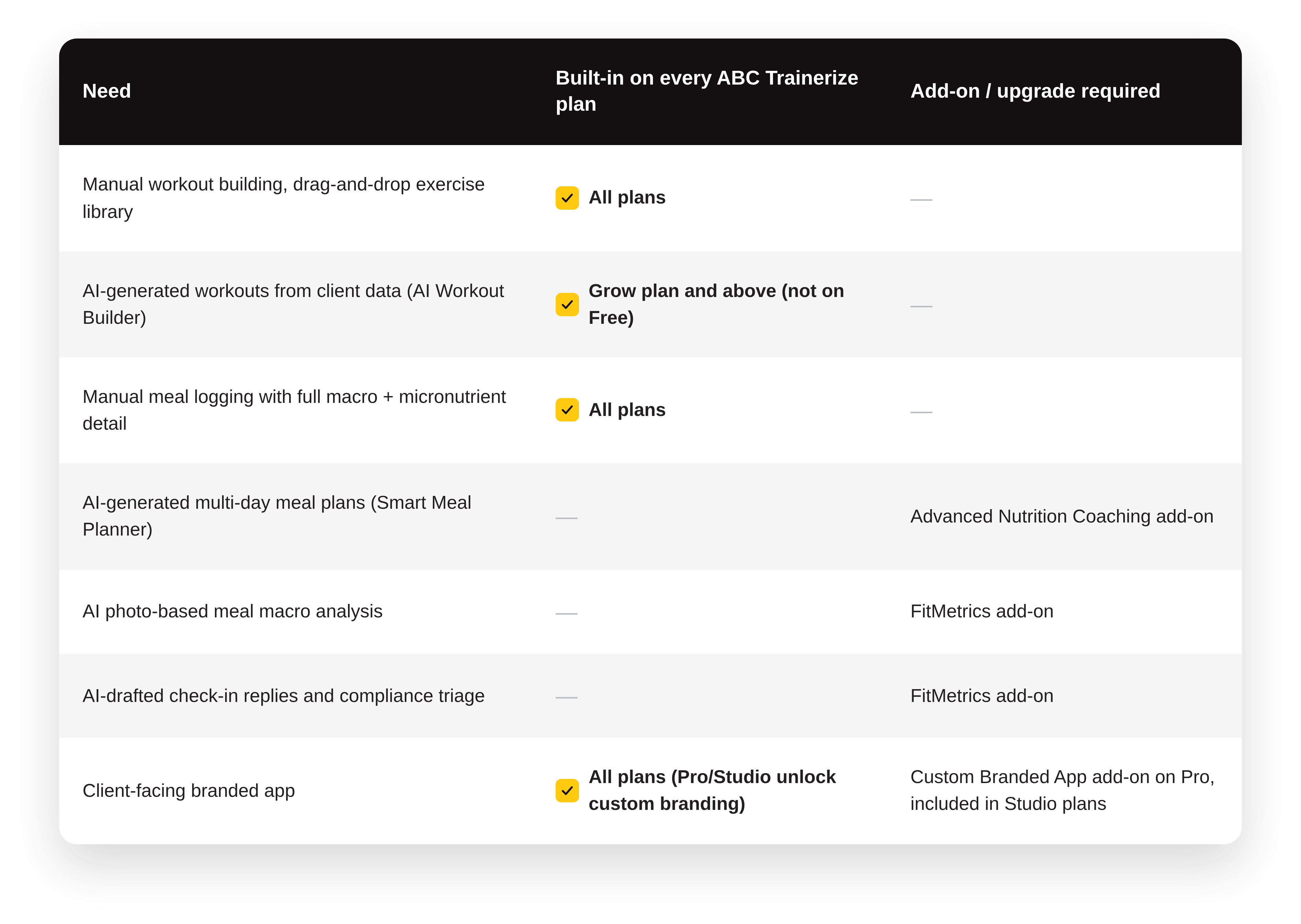
FitMetrics pricing is usage-based rather than a flat add-on fee — see the FAQ below for current rates, or check the FitMetrics feature page for the latest information.
Decision framework: is coach-in-the-loop AI right for your business?
Use this quickly, before reading pricing details:
- Are you spending more than a few hours a week on program design, meal plan building, or check-in replies that follow a repeatable pattern? If yes, AI drafting will likely save real time.
- Do you already keep client profiles (goals, history, equipment, restrictions) reasonably current? If not, start there first. AI output is only as personalized as your data.
- Are you comfortable reviewing every AI output before a client sees it, not skipping that step to save more time? If the honest answer is “I’d probably start skimming,” that’s a workflow risk to plan for, not a reason to avoid the tool.
- Is your current platform’s AI built into your existing client data, or a separate tool you’d have to copy-paste into? A disconnected AI tool adds a step instead of removing one.
If your answers point toward “yes, and I’d stay disciplined about review,” coach-in-the-loop AI coaching software is very likely worth adopting now rather than waiting.
What it costs
ABC Trainerize pricing, as published on the pricing page:

All paid plans include a 30-day free trial with no credit card required. FitMetrics is a separate paid add-on, priced per client rather than as a flat monthly fee, available to any paid ABC Trainerize account. See the FAQ below for current FitMetrics pricing.
FAQs
Can AI actually create a full workout program, or just single workouts? The AI Workout Builder generates individual workouts from client data and prompts, and you can now start that flow directly from Master Workouts, Master Programs, or a client’s training phase, then build out a full program by generating and assigning workouts one at a time.
Does AI-generated coaching mean I don’t need to review anything? No. Every AI-generated workout, meal plan, and check-in reply in ABC Trainerize is a draft pending your review and edits. Nothing reaches a client automatically.
What client data does the AI actually need? For workouts: goals, training and cardio history, equipment access, and any injuries or restrictions. For meal plans: calorie target, macro approach, dietary pattern, and food allergies or sensitivities. More complete data means less editing after generation.
Is AI-generated nutrition guidance the same as working with a dietitian? No, and it isn’t positioned as one. The Smart Meal Planner generates structured meal suggestions based on the parameters you and your client set; it doesn’t replace clinical nutrition or medical dietary guidance for conditions that require one.
Does the AI have access to my clients’ personal information? The AI Workout Builder specifically does not access client names or other personally identifiable information; it works from training and profile data points.
How much does AI coaching software cost with ABC Trainerize? The AI Workout Builder is included on the Grow plan ($9/month) and above at no extra charge. AI-generated meal plans require the Advanced Nutrition Coaching add-on ($20–45/month depending on plan tier, included on Studio plans). FitMetrics, the AI check-in, meal-photo, and compliance add-on, is priced per client rather than as a flat fee: the Starter tier is $6/client/month with a minimum of 25 clients or $150/month, and the Scale tier is $10/client/month with a minimum of 50 clients or $500/month. Current FitMetrics pricing is always confirmed on the FitMetrics feature page.
How much does FitMetrics cost? FitMetrics has two tiers. Starter runs $6 per client per month, with a minimum of 25 clients or $150/month, whichever is greater. Scale runs $10 per client per month, with a minimum of 50 clients or $500/month, whichever is greater. Both are add-ons on top of a paid ABC Trainerize plan. For the most current rates, see the FitMetrics feature page.
The bottom line
AI can generate a genuinely personalized first draft of a workout or a meal plan in minutes, using a client’s real goals, history, equipment, and preferences. What keeps a coach in control isn’t a limitation bolted onto the AI. It’s the actual design: every output is editable, nothing sends without your review, and the system is built to remove repetitive drafting work, not the judgment that makes you worth paying for.
If you’re weighing whether that combination, real speed plus real control, fits how you coach, the fastest way to find out is to try it against your own client roster.
Start your free trial of ABC Trainerize →
Already curious about the admin side specifically? See what FitMetrics automates for check-ins and meal logging, or go deeper on how the AI Workout Builder works before you commit to a plan.