

Group coaching is the lever most coaches reach for next when they want to scale. And for good reason, since 57% of active consumers cite social connection as the main reason they join a fitness community.
Group personal training lets you serve more clients in the same hour. But search for the best digital group training platform, and you hit a problem. The roundups cover general coaching tools, so the specifics for digital group fitness are often missing.
Most of them are not built for workouts, training logs, or programming. So what does a fitness coach actually need? You will get the criteria that matter in online group coaching software, a look at how the main options handle each one, and a clear view of where each fits.
What to Look for in a Digital Group Training Platform
A group coaching platform for trainers should remove the added work of managing more than one client per session. That covers async check-ins, communication, progress tracking, specific requirements shared in DMs, injuries, and more.
Use this checklist to find the best digital group training platform for your clients. Does it offer:
- Group management: Add clients to a group, start them together, and coach them as one unit.
- Group program delivery: Assign one program to many clients instead of rebuilding it each time.
- Group messaging: Keep the conversation in the same app as the training.
- Shared check-ins: Collect structured updates from every client on a schedule.
- Tracking: Log workouts, habits, and progress in one place.
- Payments: Charge for groups and memberships without a separate tool.
- Hybrid support: Serve in-person and remote clients from the same programs.
#1. Cohort Management and Program Delivery to Groups
Group coaching works when you build once and deliver many times. That is the idea behind Master Programs in ABC Trainerize. You build the program in advance, create the group, and switch the program on. Everyone starts together, which keeps cohort management simple.
Habits can travel with the program. Master Habit Programs let you schedule habits inside phased master programs. You can roll out a habit routine, such as hydration or daily steps, to multiple clients at once instead of assigning it to one client at a time.
In turn, you can cover different needs for different clients inside the same group. Say a client mentions trouble with sleep or water intake. Add a habit program to their workouts, and you can track it all in one place instead of juggling extra notes for every single client within a group.
If you work with other coaches, the Master Programs Library keeps everyone on the same page. Owners and admins get to manage a shared folder of programs, too. Other trainers can copy a program into their personal folder and customize it without changing the original.
Of course, each tool might handle this slightly differently. TrueCoach, for example, offers mass assignment from its Groups area and lets you clone templates for future cohorts. That is a simple, solid workflow.
ABC Trainerize, on the other hand, adds habits and check-in forms to the same master program calendar, so one program carries the whole group experience.
#2. Group Messaging, Community and Challenges
Groups stick when clients feel like they belong. Members who skipped group classes had a 56% higher risk of cancelling than members who took them. Peer accountability, shared goals, and a bit of friendly competition give clients a reason to keep showing up.
Read More: 5 Reasons to Add Group Personal Training to Your Fitness Business in 2026
#1. Group messaging gives your clients one place to talk to you and to each other
In ABC Trainerize, groups are shared chat spaces, and you can invite other trainers too.
Rick Mayo, owner of Alloy, says the platform “allowed all of our coaches to communicate with all of our clients and all of our other trainers.” He calls that “very difficult to do at scale and at volume.”
Read Alloy’s story for the full picture.
#2. Challenges and leaderboards add the competitive layer.
ABC Trainerize supports two challenge types:
- Leaderboard challenges end with three top winners.
- Threshold challenges let every client win by hitting the same preset point goal.
You set how clients earn points, from workouts and cardio to daily habits and nutrition goals, and the points add up automatically.
Overall, we suggest you use a leaderboard when you want competition. Or use a threshold when you want the whole group to succeed. A leaderboard motivates your top performers but can quietly discourage everyone else.
🌟 Check Out: Our fitness challenge guide and challenges update walkthrough setup.
Shared Check-Ins and Progress Tracking at Scale
Checking on every client one message at a time eats your week. Structured check-ins fix that. With shared check-ins, every client answers the same questions on the same schedule. This way, you can spot problems early instead of hearing about them after a client quits. Or awkwardly not even remember them sharing it in the first place.
ABC Trainerize check-in forms hold up to 10 questions. You can use single-answer, multiple-answer, text, and 1 to 10 rating questions. The latter, of course, are most clients’ favorites.
You can go ahead and schedule a form in a master program calendar, and it reaches every client automatically on the right day. Clients complete it in the app. You review answers in the client’s Check-In tab or the Recent Activities dashboard. That’s all!
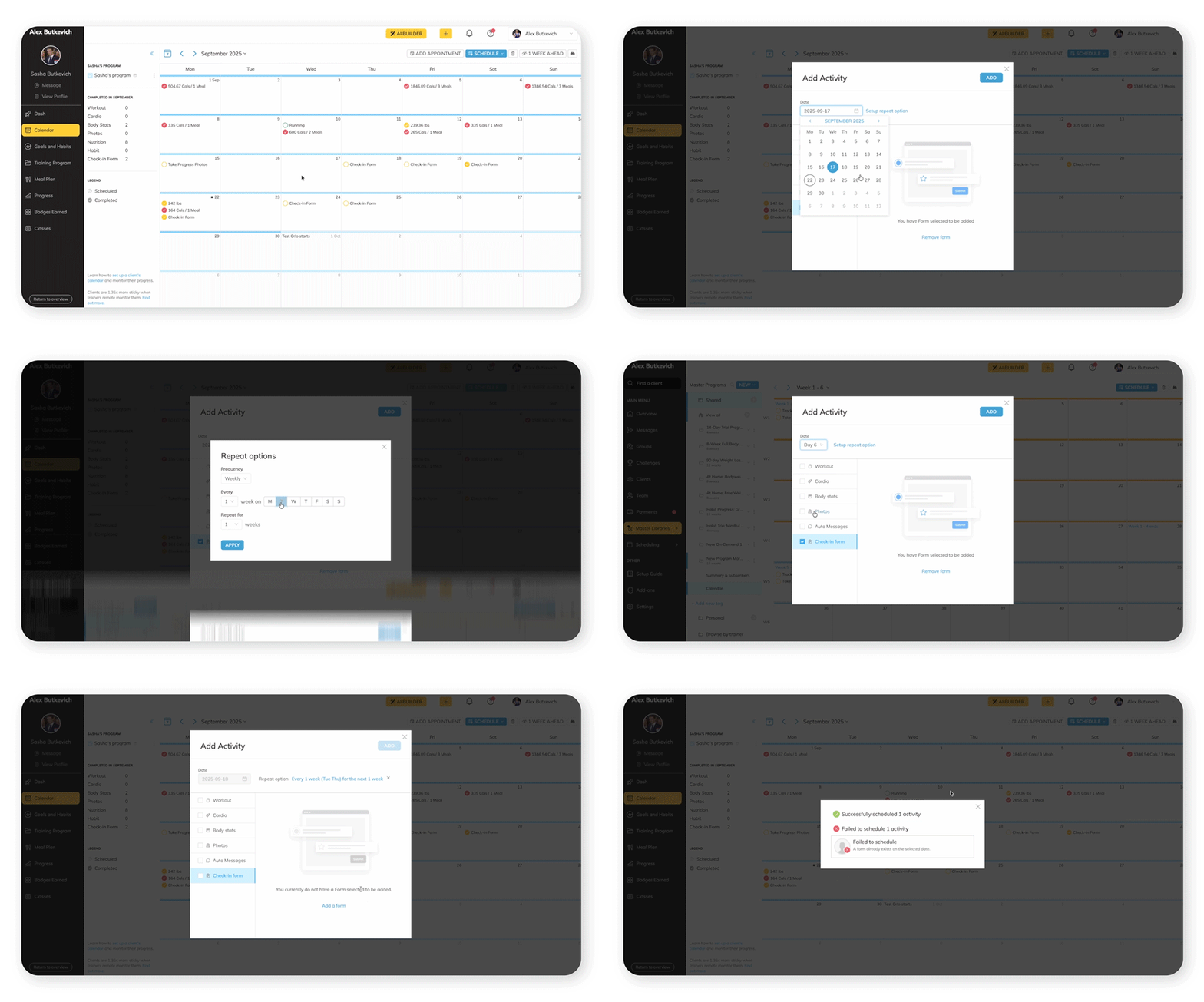
Keep your group questions simple. Ask about sleep, soreness, stress, and how well the client stuck to the plan. Also, there’s a nice thing! Because workouts and habits are logged in the same app, you can compare what a client says with what they actually did.
Best Digital Group Training Platform Comparison: Where Each Option Fits
We build ABC Trainerize, so we are not neutral. To keep this fair, we only used what each of these online group coaching software platforms says on their own pages as of October 2026.
| Platform | Group delivery | Community and challenges | Check-ins | Branded app | Price from |
|---|---|---|---|---|---|
| ABC Trainerize | Master Programs | Group chat, leaderboard, and threshold challenges | Check-in forms | Studio plan, or Pro add-on | $9 |
| Everfit | Assign to many clients | Forums, leaderboards (Autoflow add-on) | Check-in dashboard | Enterprise white-label | Free, then $19 |
| My PT Hub | Groups, multi-assign | Communities | Automated check-ins | White-label app | $22.50 |
| TrueCoach | Mass assignment | Group message threads | Dashboard, check-in polls | Standard plan and up | $26.34 |
Entry plans come with different client allowances, so check each pricing page before you compare.
1. ABC Trainerize
ABC Trainerize is built for fitness coaches who want to run a group from start to finish in one app.
You build a program once, attach it to a group, and add habits, challenges, and check-in forms around it. It fits coaches who want group program delivery, messaging, and accountability together, including hybrid coaching.
- Group features: Master Programs attach to a group, Master Habit Programs add habits, and Groups give you shared chat and challenges.
- Check-ins and tracking: Check-in forms go out on a schedule inside a master program. Answers land in the client’s Check-In tab or the Recent Activities dashboard.
- Branded app: A Custom Branded App is included with Studio and available as a Pro add-on.
- Pricing: From $9 per month. Check our pricing page for more details.
2. Everfit
Everfit pairs group programming with a forum-style community. You can assign one program to many clients, post in private Forums, and tie ranked leaderboards to Autoflow challenges.
It suits coaches who want a visible community space. But you must feel comfortable adding the Autoflow add-on for leaderboards.
- Group features: Assign one program to many clients, run private Forums, and attach leaderboards to Autoflow challenges.
- Check-ins and tracking: A check-in dashboard sorts clients into At Risk, Need Attention, and On Track.
- Branded app: Custom branding on Pro and Studio, with white-label on Enterprise.
- Pricing: Free starter plan, paid plans from $19 per month, and the Autoflow add-on from $29 per month.
3. My PT Hub
My PT Hub is a flexible coaching app where you can run private or public communities, message clients in groups, and use multi-assign shortcuts to coach many clients at once.
It suits coaches who want a post-and-comment community and automated check-ins alongside their programming. It also offers a fully white-labeled app.
- Group features: Private or public communities with no limit, in-app group messaging, and groups with multi-assign shortcuts, per its features page.
- Check-ins and tracking: Automated check-ins repeat daily, weekly, bi-weekly, or monthly. Responses land in a check-ins inbox.
- Branded app: A fully white-labeled app with app store listings. The app icon is a paid add-on.
- Pricing: Starter lists at $25 per month, or $22.50 at the lower rate.
4. TrueCoach
TrueCoach keeps group coaching simple. You assign one program to a group from the Clients area, save programs as templates for future cohorts, and message groups in threads.
It suits coaches who want a fast, focused workflow for assigning programs and messaging groups. Its dashboard also sorts clients by compliance, so you can see who needs a nudge.
- Group features: Mass assignment to groups, templates you can clone for new cohorts, and group message threads with text, video, GIFs, and check-in polls.
- Check-ins and tracking: The dashboard sorts clients by compliance and surfaces who needs attention.
- Branded app: A custom-branded app comes with the Standard plan and up.
- Pricing: Plans run from $26.34 to $136.99 per month.
Verdict: For most fitness coaches, ABC Trainerize is the stronger all-around choice. It covers the full loop: build the program, deliver it, keep the group talking, run a challenge, and check in on everyone. You do not stitch together separate tools. For a side-by-side look, read our full comparison, or browse online coaching platforms and remote trainer platforms.
FAQs: Group Coaching Platforms
1. What software works best for running group coaching programs online?
The best software for online group coaching handles the training, not just the conversation. Look for four features:
- Master programs: Build one program and assign it to the whole group.
- Group messaging: Answer questions and keep clients accountable in one place.
- Challenges: Add friendly competition that keeps everyone showing up.
- Check-in forms: Spot problems early without chasing individual updates.
2. Can personal trainers run group coaching online?
Yes. Personal trainers run group coaching online by building a program once, adding clients to a group, and coaching through messaging and check-ins. Done well, it helps you scale coaching without adding hours. Your coach dashboard surfaces recent client activity, including check-in submissions, so you can see who needs a nudge. That attention supports group client retention.
3. Do I need a separate community platform for group coaching?
Usually not. Group messaging inside your digital group fitness software keeps workouts, habits, and conversation together. If you want an open community feed where clients post updates, a feed-style tool can add that. It is not required to run a strong group.
4. Can I run in-person and online group training with one app?
Yes. With hybrid coaching, in-person and remote clients can follow the same group programs in one app, including a Custom Branded App. Remote clients can join an existing program and follow it on their own schedule. Read our guide to hybrid personal training for the full model.
Start Your Group Program Today
Before you pick the best digital group training platform for your coaching, run one test. Can you build a program once, assign it to a whole group, message everyone in one place, and review every check-in without leaving the app? If any answer is no, that gap turns into manual work as your group grows.
Start for free and set up your first group to see how it feels.