

Spreadsheets are one of the most relied-on PT business tools in fitness, and for good reason. But they have real limits, and most coaches hit them sooner than expected. By the time you realize you’re losing time, hurting your reputation with clients, and that there’s a better way to handle it all, you’re already overdue for a change.
For coaches serious about scaling a personal training business, the tools you start with rarely hold up as your roster grows.
If you’re looking for a solid personal trainer spreadsheet alternative, this article will help you recognize the tipping point and show you exactly what changes when you make the switch to dedicated personal training software. Every section below maps to something you’re likely doing manually right now, and what it looks like when software handles it instead.
When Google Sheets Fitness Coaching Hits Its Limits
Let’s be clear about where spreadsheets for personal training genuinely hold up:
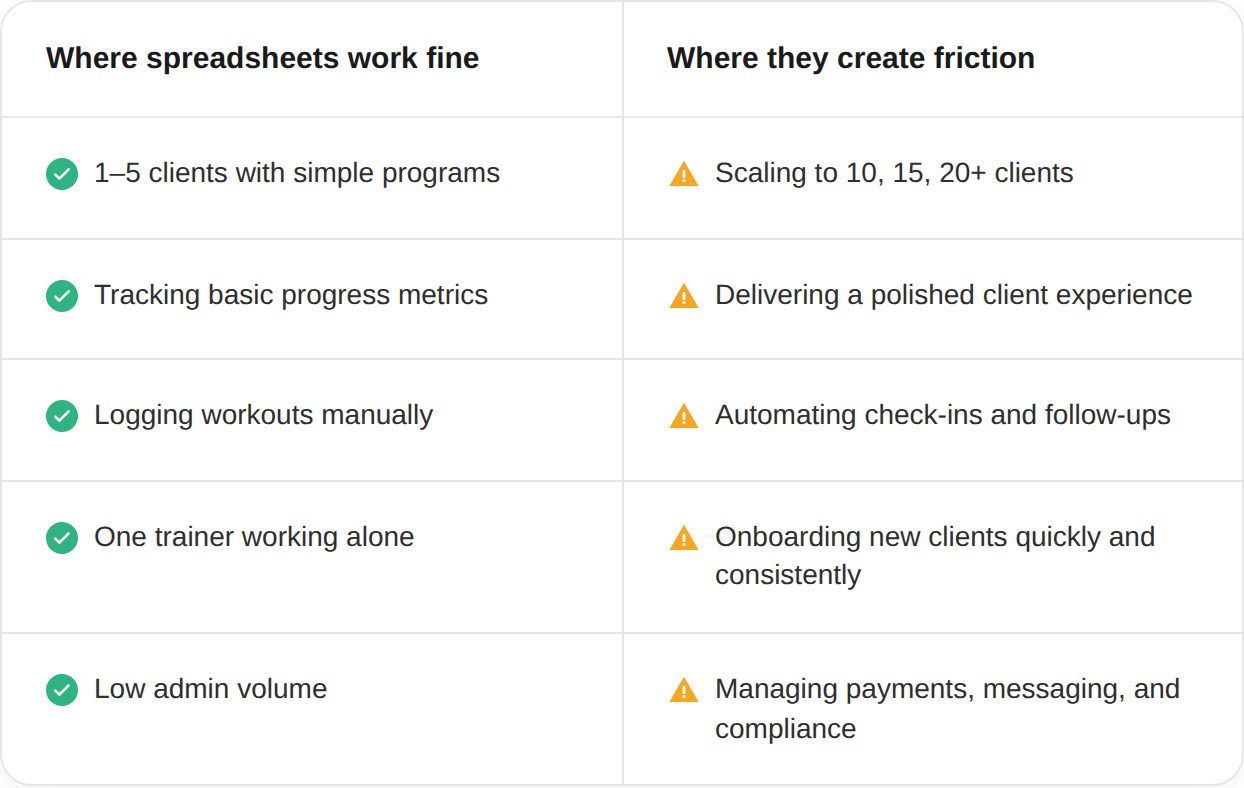
The friction isn’t usually visible at first. It builds quietly in the form of an extra text here, a manual invoice there, a check-in you forgot because it wasn’t triggered automatically.
By the time you’ll realize your spreadsheet system is slowing you down, you’re already spending two or three hours a week on admin that a client program management software would handle in the background.
The question isn’t whether spreadsheets can technically hold your client data. They can. The question is what it costs you per client, per week, to run your business that way.
👉 Download the Free Personal Trainer Software Tools Cheat Sheet
7 Ways Personal Training Software Works Differently
With the right personal training software, spreadsheets can still play a supporting role, for a while.
But each point below maps to something you’re currently doing manually that software handles automatically, and the gap widens the longer you wait.
1. Program building: templates and libraries vs. rebuilding every sheet from scratch
When a new client signs up, how long does it take you to build their program?
If your system lives in Google Sheets or Excel, the answer probably involves copying a previous client’s tab, renaming things, adjusting sets and reps, reformatting cells, and hoping nothing breaks a formula.
Personal training software gives you an exercise library with video demonstrations already built in, drag-and-drop workout builders, and reusable program templates you build once and assign in seconds. A program that takes 45 minutes to rebuild in a spreadsheet can take under five minutes in software, once your templates are set up.
That time difference is per client, per program cycle. At ten clients updating programs monthly, that’s hours recovered every single month, without touching a formula.
Add to that an AI Workout Builder that generates fully personalized programs based on each client’s goals, past workouts, and preferences. You’re not just saving time at that point — you’re delivering a better program than any manually built spreadsheet could produce.
Read more: Workout Builder Software for Personal Trainers
2. Clients get a real app, not a PDF link they’ll lose
This is the one that affects client retention more than any other. When you send a client their program as a spreadsheet link or a PDF, you’re asking them to manage their own experience.
They have to remember where the file is, figure out how to log their results, and come back to you with questions that a good app would answer automatically.
A personal trainer spreadsheet alternative built for client delivery means your clients open an app with their name on it, see their program laid out with exercise videos, and log their workouts directly inside the platform.
Their check-in reminders come through push notifications. Their progress photos stay in one place. Their coach, you, can see all of it in real time.
The experience gap between “here’s your Google Sheet” and “here’s your app” is visible to clients from day one, and it directly affects how long they stay and how likely they are to refer others.
👉 Read more: Best Personal Trainer Apps for Scaling Personal Training Business
3. Check-ins happen automatically, no more manual follow-up texts
Manual check-ins are one of the biggest time drains in any coaching business. If your system for checking in on clients is a recurring reminder on your phone to text them individually, you already know how inconsistent this gets as your roster grows.
Scaling a personal training business with automated check-ins means setting a prompt once, for example, on day 3 of a new program, every Sunday evening, after a missed workout, and having it go out automatically to every client it applies to.
For coaches, that means consistent touchpoints without consistent manual effort, which is one of the biggest practical advantages of spreadsheets vs. training software at scale.
👉 Read more: Personal Trainer Business Apps: Top Picks to Grow, Coach, and Scale
4. Progress lives in one dashboard, not scattered across fifteen tabs
Ask yourself how long it would take you right now to pull up six months of progress data for any one of your clients. Photos, measurements, workout logs, compliance rates, nutrition check-ins.
If that data is spread across a spreadsheet, a phone camera roll, and a thread of text messages, the honest answer is probably “longer than it should.”
A dedicated client program management platform keeps everything in one place: body metrics, workout history, progress photos, habit tracking, and coach notes.
You can pull it up in seconds, share it with the client in a review call, and use it to make programming decisions based on actual patterns rather than memory.
This is also the layer where clients feel most supported. Seeing their own data organized and visible changes how they perceive the value of your coaching, because it shows them you’re paying attention.
👉 Read more: Client Progress Tracker: Essential Tool for Personal Trainers
5. Payments don’t require chasing
If you’re invoicing clients manually or reminding people their payment is due, you’re doing work that software eliminated years ago.
Recurring billing means a client’s card is charged automatically on their billing date, every cycle, without a reminder from you or a payment link in a text thread.
The difference between manual invoicing and automated recurring billing isn’t just time, it’s revenue, too. Late payments, forgotten renewals, and awkward payment conversations are friction points that reduce client retention. When payment is automatic and seamless, it stays invisible, which is exactly where it should be.
Personal training software with payments built in also lets clients purchase packages directly from your storefront, upgrade their plan, or buy an add-on without involving you in the transaction at all. That’s a sales funnel that runs while you’re coaching, which no spreadsheet can replicate.
👉 Read more: Online Payment Solutions: The Best of 2026
6. Communication doesn’t leak into your DMs
Most coaches end up with at least two messaging channels running at once, and that’s sometimes unavoidable. WhatsApp, Instagram DMs, and text are where clients live casually, and that’s fine. But important coaching communication belongs somewhere else.
When check-ins, form questions, and program notes are scattered across three or four channels, things get missed. In-app messaging keeps every client conversation tied to their profile, with full history visible, so the coaching stays in the platform, and the casual stuff stays where it naturally happens anyway.
Email automation takes care of the communication that should never be manual in the first place:
- Onboarding sequences that welcome new clients automatically
- Milestone messages that fire when progress is hit
- Re-engagement nudges for clients who’ve gone quiet
- Upsell prompts when someone’s ready for the next phase.
Every touchpoint runs in the background, so the messages you actually write yourself are the ones worth writing.
👉 Read more: Ultimate Guide to Online Personal Training: Coaching, Packages, and Success Tips
7. Adding a new client doesn’t add proportional work
This is the one that defines whether you can actually scale. In a spreadsheet system, every new client creates roughly proportional work: a new tab, a new payment setup, a new check-in schedule, a new folder for their photos. Each one costs nearly as much admin time as the first.
In software, scaling a personal training business works differently. Your templates are already built. Once the system is set up, each new client costs a fraction of the time earlier ones did, because the repeatable parts take care of themselves.
That’s not just a time-saving. It’s a shift in how you spend your working hours. Less admin, less chasing, less rebuilding from scratch, and more time on actual coaching, on marketing, and on growing your revenue. You still need to maintain the system and keep it clean, but that’s light work compared to what spreadsheets demand.
👉 Read more: 9 of the Best Remote Personal Trainer Platforms for 2026
When Does the Switch Actually Make Sense?
There’s a practical threshold most coaches hit: 10+ clients and more than two hours a week on admin. At that point, the cost of software (typically $30–$60/month for a platform like ABC Trainerize) is covered many times over by the time it saves you.
Run the numbers for yourself:
- At 10 clients, if software saves you 90 minutes of admin per week, that’s 6 hours per month.
- At $75/hour coaching value, that’s $450/month recovered from tasks you should never be doing manually.
- At 20 clients, that gap widens considerably.
The switch isn’t about whether spreadsheets “work.” It’s about what your time is worth and whether your system grows with you or against you.
Remember, the best personal training software isn’t the one with the most features; it’s the one that removes the most friction between you and your clients, and between your clients and their results.
How to Manage Personal Training Clients without Spreadsheets: The Short Version
If you’re short on time, here’s the whole approach in one place: replace the spreadsheet with software that handles programming, tracking, check-ins, payments, and messaging together, instead of stitching together five separate tools.
- Programming: build once with templates instead of rebuilding every client’s plan from a copied tab
- Client experience: a real app instead of a PDF or shared sheet clients have to manage themselves
- Check-ins: automated and scheduled, not a recurring phone reminder to text people individually
- Progress: one dashboard instead of data scattered across tabs, photo rolls, and text threads
- Payments: recurring billing that runs itself, instead of manual invoicing and chasing
- Communication: one in-app thread per client instead of conversations leaking across DMs and texts
The tipping point is usually 10+ clients or more than two hours a week on admin. Past that, the cost of dedicated software is covered many times over by the time it gives back.
👉 Read more: Why You Should Use Personal Training Software
FAQs
How do I manage personal training clients without spreadsheets?
Move each piece of your spreadsheet system into dedicated software, one at a time if needed: program templates instead of copied tabs, a client-facing app instead of a shared sheet, automated check-ins instead of manual reminders, and recurring billing instead of manual invoicing. Most coaches feel the difference immediately once check-ins and payments stop requiring their attention every week.
Is personal training software better than spreadsheets?
Yes, especially once your business starts to grow or you’re delivering hybrid or online training. Spreadsheets are a reasonable starting point, but software is significantly more efficient for your time and for the experience your clients get, and the difference becomes harder to ignore the more you scale.
When should I switch from spreadsheets to personal training software?
The clearest signal is when admin work starts taking more than two hours a week, or when new clients require the same setup time as your first ones did. Both indicate that your system isn’t scaling with your business.
Can I manage 10+ clients with a spreadsheet?
Technically, yes. Practically, managing 10+ clients in a spreadsheet means manually handling check-ins, progress tracking, payments, and communication, all of which software handles automatically. Most coaches find the tipping point somewhere between 8 and 12 clients.
How much time does personal training software save compared to spreadsheets?
It varies by how complex your programs are and how many clients you have. Coaches typically report recovering 2–5 hours of admin time per week after switching, primarily from program delivery, check-in follow-up, and payment management.
What’s the best personal trainer spreadsheet alternative?
ABC Trainerize is the most widely used platform for coaches delivering hybrid and online training. It combines program delivery, client communication, progress tracking, habit coaching, nutrition, and payments in one app. You can start for free to see how it compares to your current setup.
👉 Read more: The Best Online Personal Training Software in 2026
Build the System, Then Grow the Business
Spreadsheets got you started. That’s not nothing. But the coaches who scale aren’t the ones who work harder inside a broken system, they’re the ones who replace it before it costs them more than they realize.
Every tactic, template, and automation sitting inside personal training software is time you get back. Time you spend coaching, marketing, and building something that doesn’t depend on you manually holding it together.
The system does the heavy lifting. You do the work that actually matters.
Start your free trial of ABC Trainerize and see what your week looks like when the admin runs itself.