
If you’re comparing personal training software for progress tracking, you’ve probably noticed most all-in-one platforms treat it as an afterthought — buried under generic workout logging instead of built out as the feature that actually proves your programming works.
It’s what keeps clients renewing instead of quietly canceling. This comparison tests Trainerize, Everfit, and FitBudd specifically on progress tracking: how it’s logged, what’s measured, how connected it is to the rest of your coaching workflow, and what the client actually sees.
Progress Tracking: The Core Differentiator
Progress tracking is the difference between a client trusting your programming and a client guessing whether it’s working. When someone can see their lifts trending up, their measurements trending down, and their workout completion holding steady, you don’t have to sell them on renewing, the data does it for you.
It’s also the foundation for one of the most effective retention tools available: turning that kind of data into real coaching conversations. See our guide on using compliance to drive client results for specific tactics.
For trainers scaling past a handful of clients, tracking that used to live in spreadsheets or paper logs has to become automatic and visual, or it stops happening at all.
This comparison scores Trainerize, Everfit, and FitBudd on four dimensions:
- Logging method: how workouts actually get recorded. Manual entry vs. automatic wearable sync
- Progress photos & measurements: visual proof of change, not just numbers on a page
- Scheduling & messaging integration: how connected progress tracking is to the rest of the coaching relationship
- Report quality: what the client actually sees when they open their progress dashboard
Want to see habit tracking in action? Here’s a quick look at 5 creative ways to use habit coaching inside Trainerize:
Workout Logging, Analytics & Reporting: Side-by-Side Comparison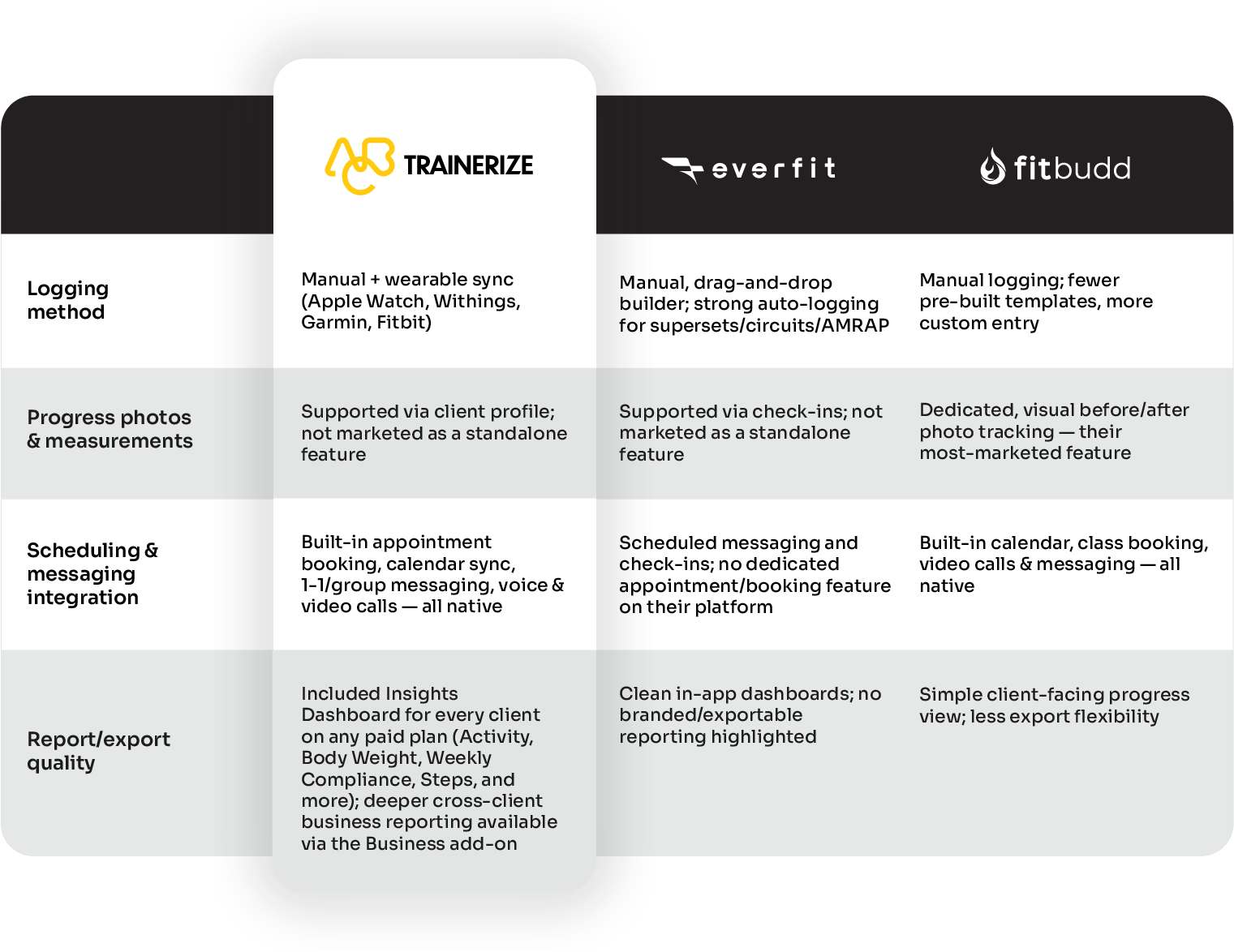
Trainerize’s real advantage isn’t just reporting, but scheduling, messaging, and progress tracking all live natively in one system. A trainer can book a session, message a client about their last workout, and pull up their progress trend without leaving the app or connecting a separate tool.
Trainerize’s AI Workout Builder turns a written prompt into a fully structured workout (exercises, sets, reps, and rest periods included) in seconds, giving trainers a real edge on day-to-day programming speed. It’s designed to generate one workout at a time inside your existing programs, so you stay in full control of how everything fits together, rather than handing your whole coaching structure over to an algorithm. Everfit’s drag-and-drop builder is also a strong, fast option if you prefer full manual control. It just doesn’t come with Trainerize’s built-in scheduling, so coaches typically pair it with a separate booking tool.
FitBudd leads on visual progress tracking specifically, with before-and-after photo comparisons built into its core pitch, though it offers less room to customize analytics or reporting as a business scale.
If you want a broader view of what to measure beyond this comparison, our Personal Trainer KPI Cheat Sheet breaks down the metrics worth tracking across your whole business, not just per client.
Independent Trainer Pricing:
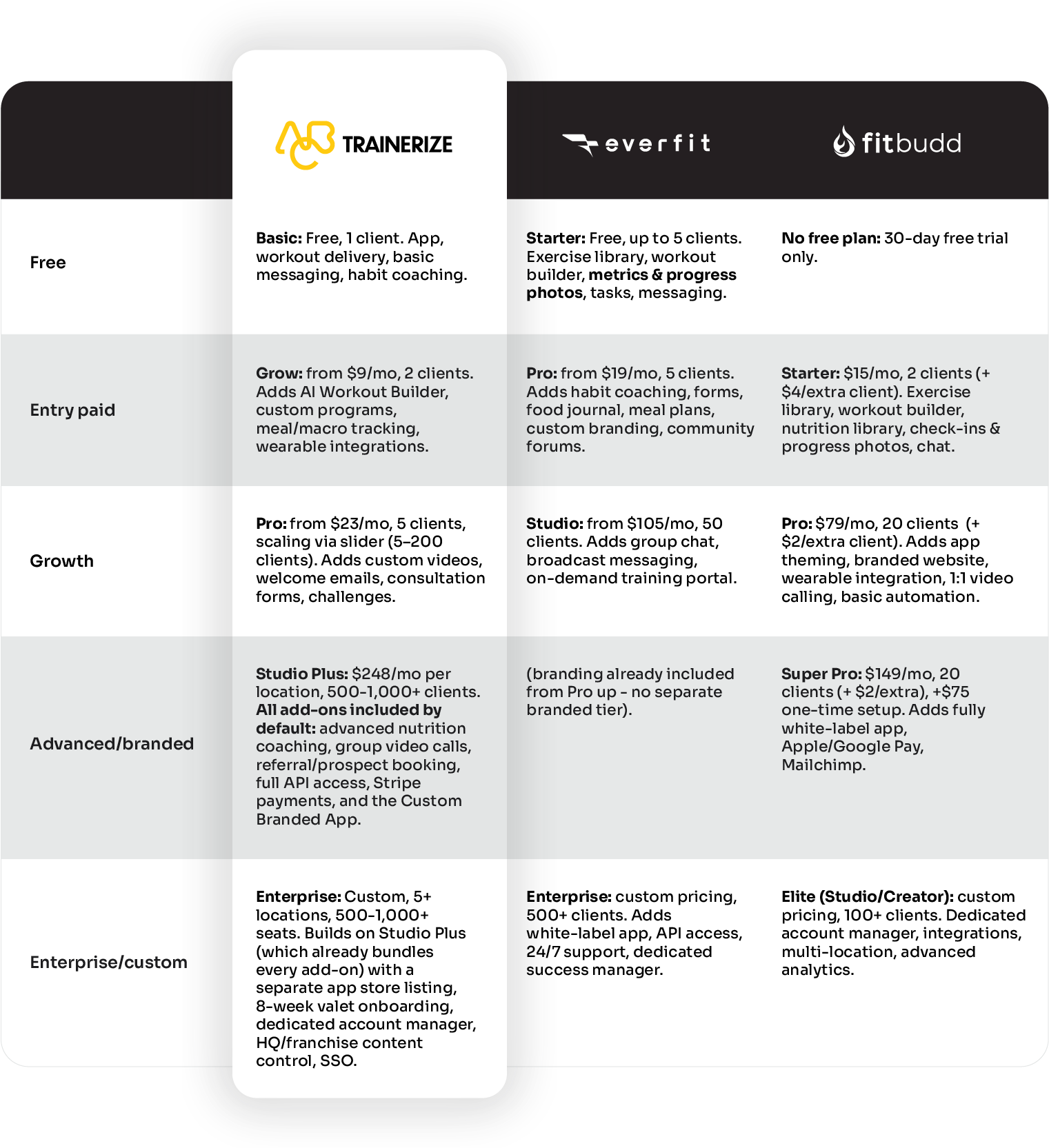
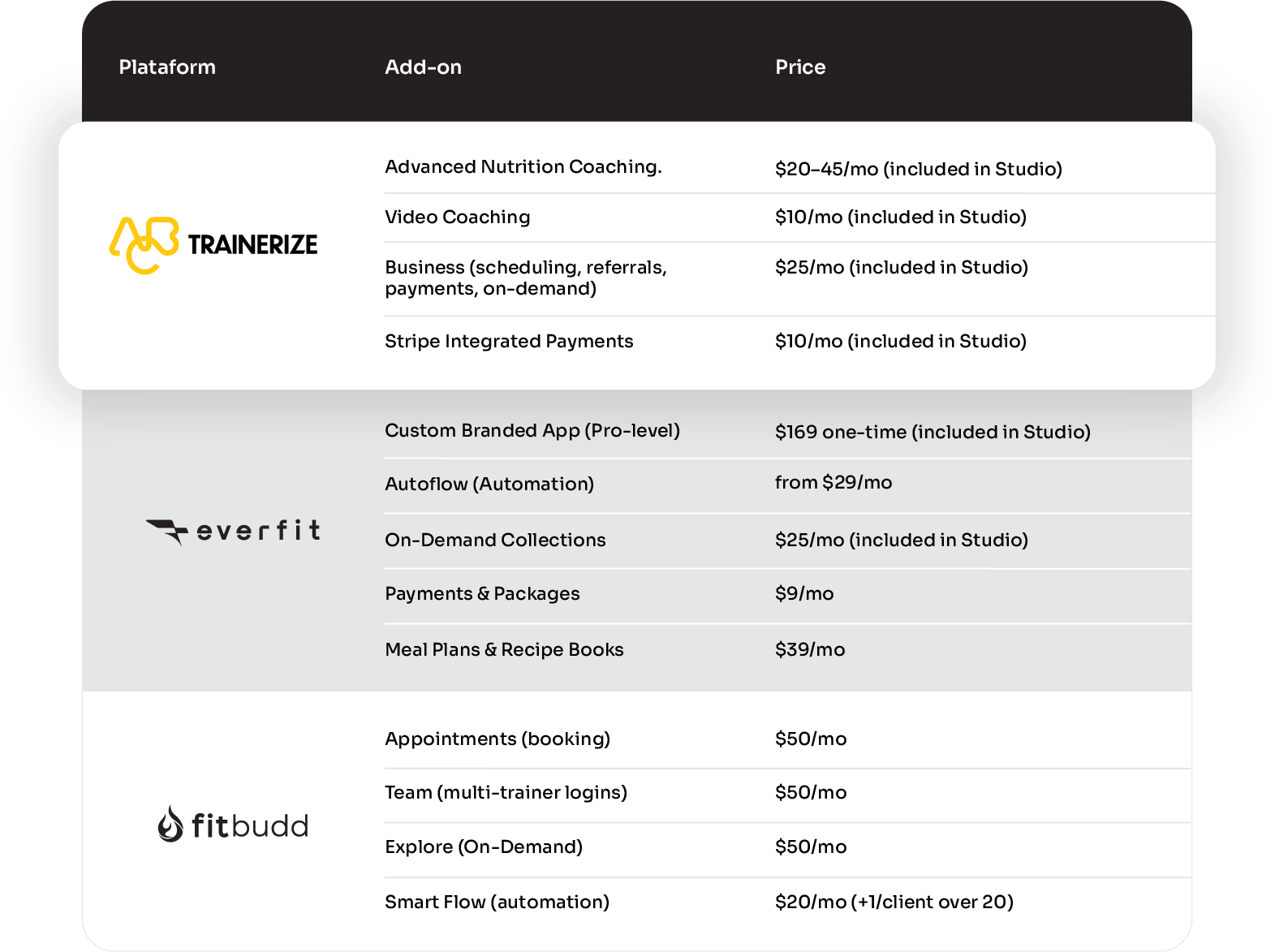
Beyond the core plan tiers, each platform sells specific workflows as separate add-ons: automation, scheduling, payments, and more.
Here’s what’s available on top of the plans above, and what each one actually costs:
If you’re planning to grow, Trainerize is the platform built for that. The free Basic plan lets you start at zero cost, and the Pro tier’s slider (one continuous plan from 5 all the way to 200 clients) means you won’t hit a wall the moment you sign a new client, unlike Everfit and FitBudd, which both force a jump at their 50- and 20-client marks.
At the top end, Trainerize’s Enterprise tier folds every add-on in by default, which adds up to real savings once you’ve outgrown à la carte pricing.
Everfit still makes sense if you’re running a studio and want a lower entry price to start, and FitBudd gets you to a white-label app a little sooner if that’s the one thing you care about most.
But for a coaching business that wants to keep growing without switching platforms every time it crosses a client threshold, Trainerize is the one built to keep up.
Trainerize vs Everfit vs FitBudd: Pros, Cons & Best Fit
Trainerize
Best for: established trainers and hybrid studios that want one system for the whole business.
Strengths: the deepest all-in-one feature set of the three (workouts, habits, nutrition, messaging, payments, branded reporting), built to scale from solo trainer to multi-coach studio without switching tools, plus the largest exercise video library.
Weaknesses: that same depth means more to learn upfront, and add-ons can add up quickly if you need several at once.
Everfit
Best for: coaches who live in the workout builder and want fast, flexible programming.
Strengths: the fastest workout-building experience of the three, good habit tracking and community/forum features, transparent per-client pricing.
Weaknesses: nutrition is clearly secondary. Meal planning is a paid add-on, not a core strength and reporting is lighter than Trainerize’s.
FitBudd
Best for: solo trainers and small studios who want a simple, affordably-branded app without a big learning curve.
Strengths: lower entry cost, a branded app included earlier in the pricing ladder, straightforward setup.
Weaknesses: fewer pre-built workout templates and less analytics depth than the other two.
Zooming out, Trainerize’s depth is the throughline across this comparison. It’s the only one of the three built to handle nutrition, habits, messaging, payments, and reporting natively as a business scales, which is exactly why it leads on things like operational scalability and data-driven coaching.
Everfit and FitBudd each do one thing especially well: fast programming and affordable branding. But neither replaces the full system the way Trainerize does.
For a coaching business that’s growing past a handful of clients, that breadth matters more than any single feature the other two do slightly faster or cheaper.
Trainerize also holds up for trainers who coach in person, not just online. See our guide on using Trainerize for in-person coaching for how the same progress-tracking tools work between sessions, not just for fully remote clients.
Setup Time & Ease-of-Use Scoring
Getting a new client fully tracked (profile, program, and progress-tracking fields live) takes roughly 20-30 minutes on any of the three platforms once you know the workflow.
Where they differ is what that setup gets you afterward.
Trainerize has more to configure upfront because it’s built to handle nutrition, habits, messaging, payments, and reporting in one place. Coaches who spend that first week setting it up properly get a system that runs largely on autopilot from then on, instead of stitching together separate tools later.
Everfit’s interface consistently gets praised for being clean and intuitive. An advantage if visual simplicity is what you value most in day-to-day use. But when it comes to actually getting a workout built, Trainerize’s AI Workout Builder turns a written prompt into a ready-to-use workout in seconds (exercises, sets, reps, and rest periods done for you) whether you’re setting up your first client or your five-hundredth.
FitBudd’s simpler feature set means there’s less to learn on day one, but also less room to configure things exactly how you want as your business grows.
For support during setup, Trainerize backs this up with a full help-center library plus live support. See our getting-started guide for a walkthrough of the first steps.
FAQs – Progress Tracking Software
How does Trainerize stack up against other platforms for hybrid (online + in-person) coaching?
Trainerize holds current G2 badges for Momentum Leader and Grid Leader in the category, and its results speak for themselves in practice: UK gym franchise Transform Hub runs its entire hybrid, group-based coaching model on Trainerize across 44 locations, growing membership 28.4% in a single year and delivering over a million workouts network-wide. Read the full story.
Is Trainerize actually better than other all-in-one coaching apps, or is it mostly marketing?
The results back it up: Trainerize holds current G2 recognition for Easiest Setup and as a category Grid Leader, and its customer success stories span solo trainers tripling their client base to 44-location franchises scaling membership by double digits. Proof it works at very different scales, not just one marketing case study.
How well does Trainerize support branding and a white-label client experience compared to other coaching software?
Very well. The Custom Branded App add-on puts your logo and colors on the client-facing app itself, not just the coaching dashboard. It’s available a full tier earlier than Everfit’s equivalent, and without the extra developer-account setup FitBudd requires for a fully standalone app listing.
For a quick walkthrough of what this looks like in practice, see Create a Branded App Experience for Your Clients.
If I already use separate tools for billing and scheduling, is Trainerize still worth it just for programming and communication?
Yes. And this is a real advantage over Everfit and FitBudd, since Trainerize’s programming and messaging tools stand on their own. You’re not forced to adopt (or pay for) scheduling or payments just to get the progress-tracking and communication features.
Can I export my client’s progress data if I ever need to switch platforms?
Yes. Trainerize includes Weekly Progress Reports built in, plus Zapier integration to export client data. Neither Everfit nor FitBudd offer a comparable native automation integration at this writing.
Does progress tracking still work if a client’s offline mid-workout?
Yes across all three platforms. Mobile coaching apps are generally built to cache workout data locally and sync once you’re back online, so a spotty gym Wi-Fi signal won’t cost you or your client any logged progress.
Verdict: Which Platform Wins for Progress Tracking?
For most trainers scaling past a handful of clients, Trainerize is the strongest choice for progress tracking. It’s the only one of the three that handles workouts, habits, nutrition, messaging, and branded reporting natively in one system.
Backed by current G2 recognition as a category Grid Leader and real results at very different scales, from solo coaches tripling their client base to a 44-location franchise growing membership 28.4% in a year.
The Pro plan’s continuous slider (5 to 200 clients) also means you won’t outgrow it the way you might with platforms that force a jump at a fixed client threshold.
Everfit is worth a look if your coaching is workout-first and you want the fastest possible programming experience on a transparent per-client price. FitBudd fits if you want a branded app with the lowest possible learning curve and don’t need deep analytics or business tools yet.
But for a trainer or studio that wants one platform to grow into (not out of) Trainerize is built for that from day one.
Start for free
Ready to see progress tracking that scales with your business? Start for free