

ABC Trainerize has spent over a decade building a full coaching ecosystem, with native wearable syncing, studio-level partner integrations, and infrastructure built for coaches who want room to grow. HubFit is a newer platform built around a simpler pitch: bundle more into a smaller set of clearly priced tiers. The right fit depends on whether you value integration depth and scale, or transparent, all-in-one pricing.
ABC Trainerize vs HubFit: Quick Comparison
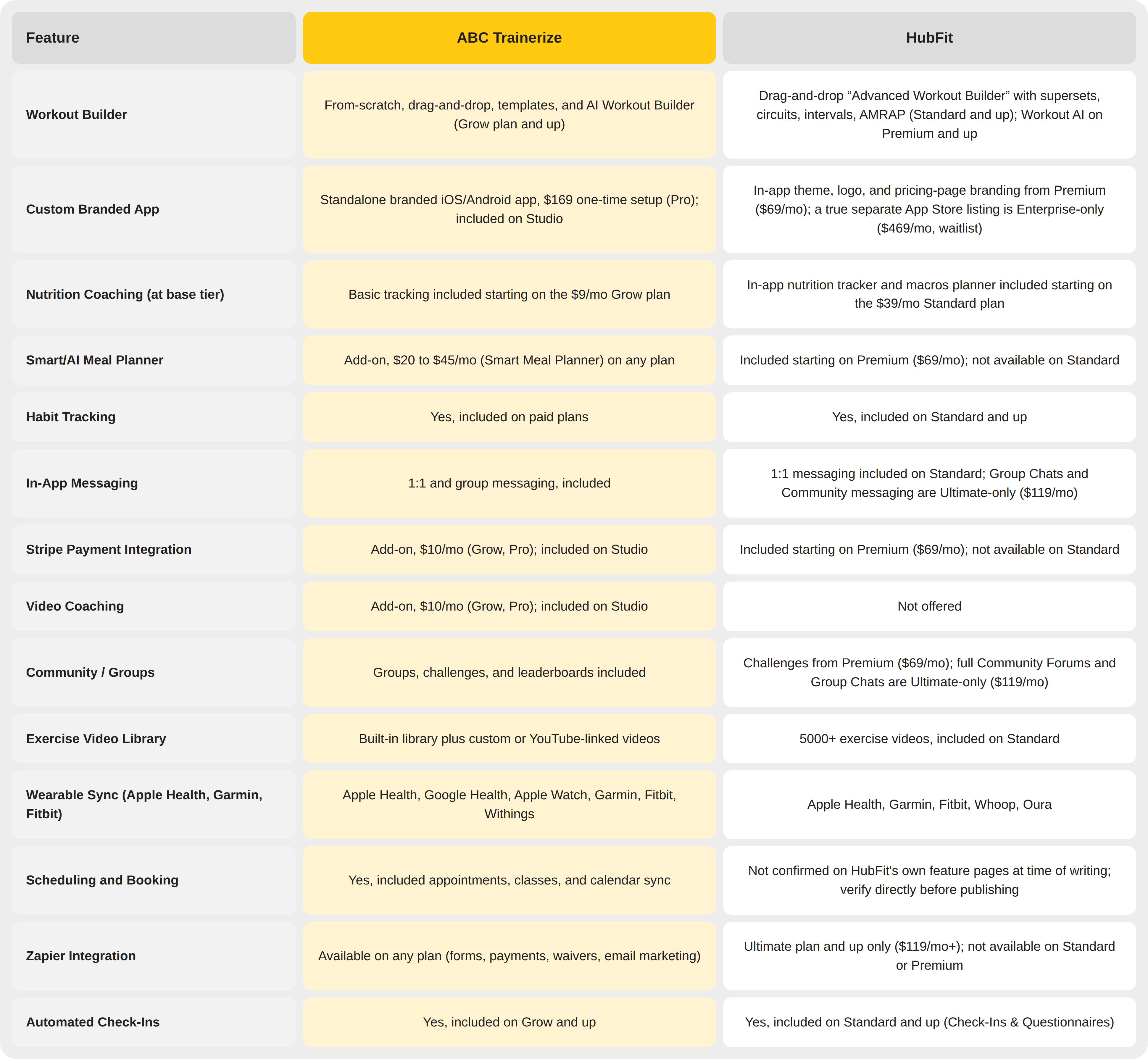
Here is how the two platforms compare on the features coaches ask about most.
Join 400,000+ trainers and fitness businesses on ABC Trainerize
Start your free trial. No credit card required.
What’s the Difference Between Trainerize and HubFit?
The main difference between ABC Trainerize and HubFit is ecosystem maturity. Trainerize has built a decade of native integrations, wearable syncing, and enterprise-ready infrastructure, while HubFit is a newer platform that bundles a smaller feature set into a few clearly priced tiers and leans on Zapier to extend beyond it.
Program Building
ABC Trainerize supports from-scratch program builds, drag-and-drop building from its exercise library, reusable templates, and the AI Workout Builder. The AI Workout Builder is available starting on the $9/month Grow plan: describe a client’s goals, equipment, and preferences, and it generates a structured, editable, schedulable draft.
Trainerize’s exercise library is professionally filmed, and coaches can upload their own custom videos or import from YouTube.
HubFit’s Advanced Workout Builder, included from its Standard plan, covers fixed and calendar programs, drag-and-drop building, and set, rep, and PR tracking, plus support for supersets, circuits, intervals, and AMRAP formats. Its own Workout AI feature exists too, but it sits behind the $69/month Premium tier rather than the entry plan.
Verdict: both platforms cover the core programming formats coaches need. Trainerize’s AI-assisted building unlocks at a lower price point, while HubFit requires an upgrade to Premium for its equivalent AI tool.
Nutrition and Meal Planning
Trainerize includes basic nutrition tracking on its paid plans, with the Smart Meal Planner available as an add-on for $20 to $45 a month depending on plan tier.
HubFit includes an in-app nutrition tracker and macros planner starting on its $39/month Standard plan, but its Smart Meal Planner and Meal AI features require the $69/month Premium tier or higher.
Verdict: Trainerize offers basic nutrition tracking at a lower entry price ($9/month Grow vs. $39/month Standard), but neither platform includes AI-assisted meal planning without an upgrade: Trainerize gates it behind a paid add-on, and HubFit gates it behind its second tier.
Client Engagement
Trainerize includes 1:1 and group in-app messaging, community forums, and challenges in both leaderboard and threshold formats.
HubFit’s own marketing highlights a genuine strength here: an in-app community feed, challenges with live leaderboards, and rich messaging with voice notes, polls, and group threads. The catch is that Group Chats, Community Forums, and Broadcast Messages are all reserved for its $119/month Ultimate plan, and Challenges require Premium ($69/month) or higher.
Verdict: Trainerize includes community and group engagement tools from its entry paid tier. HubFit’s most social features require its two most expensive plans.
Accountability
Trainerize’s habit coaching covers daily habit assignments, streaks, and badges, paired with auto-messaging for scheduled check-ins, welcome sequences, and re-engagement nudges.
HubFit’s Check-Ins & Questionnaires and Habit Coaching are genuine strengths available from its $39/month Standard plan, letting clients complete structured check-ins with progress photos. Its deeper automation tools (Autoflow Events, Autoflow Templates) require Premium and Ultimate respectively.
Verdict: both platforms keep clients accountable through habits and check-ins from their entry paid tier. Deeper automation on either platform requires moving up at least one tier.
The App Experience: Trainerize vs Hubfit
Trainerize’s client app covers fitness, nutrition, habits, messaging, groups, and progress tracking, alongside a separate trainer-side management view. Its Custom Branded App option gives coaches their own standalone iOS and Android app for a one-time $169 setup fee on the Pro plan, included free on Studio. Publishing any branded app to the Apple App Store also requires Apple’s own developer account, which is billed separately by Apple, so confirm the current fee on Apple’s developer site before quoting it.
HubFit’s app design is a genuine strength: reviewers consistently describe it as modern and dashboard-first. Its branding options, however, work differently. Premium ($69/month) and up let you theme the shared HubFit app with your logo and colors, but a fully separate App Store listing under your own name is reserved for the $469/month Enterprise plan.
On wearables, Trainerize connects natively to Apple Health, Google Health Connect, Apple Watch, Garmin, Fitbit, and Withings. HubFit connects to Apple Health, Garmin, Fitbit, Whoop, and Oura. Both lists are broad enough for most coaches; confirm the current list on each platform’s site if a specific device matters to your clients.
When each makes sense: choose Trainerize if you want a genuinely separate branded app and the broadest native integration list. Choose HubFit if a modern shared app experience and simpler setup matter more than a standalone app store presence.
What You’ll Actually Pay: Pricing and Value
All figures below were verified directly against both platforms’ live pricing pages in July 2026. Trainerize’s features beyond core workout programming are largely paid add-ons on Grow and Pro plans. HubFit bundles more into each flat tier, but several of its most-requested features, including Stripe payments, Smart Meal Planner, and community tools, are still gated by tier rather than included everywhere.
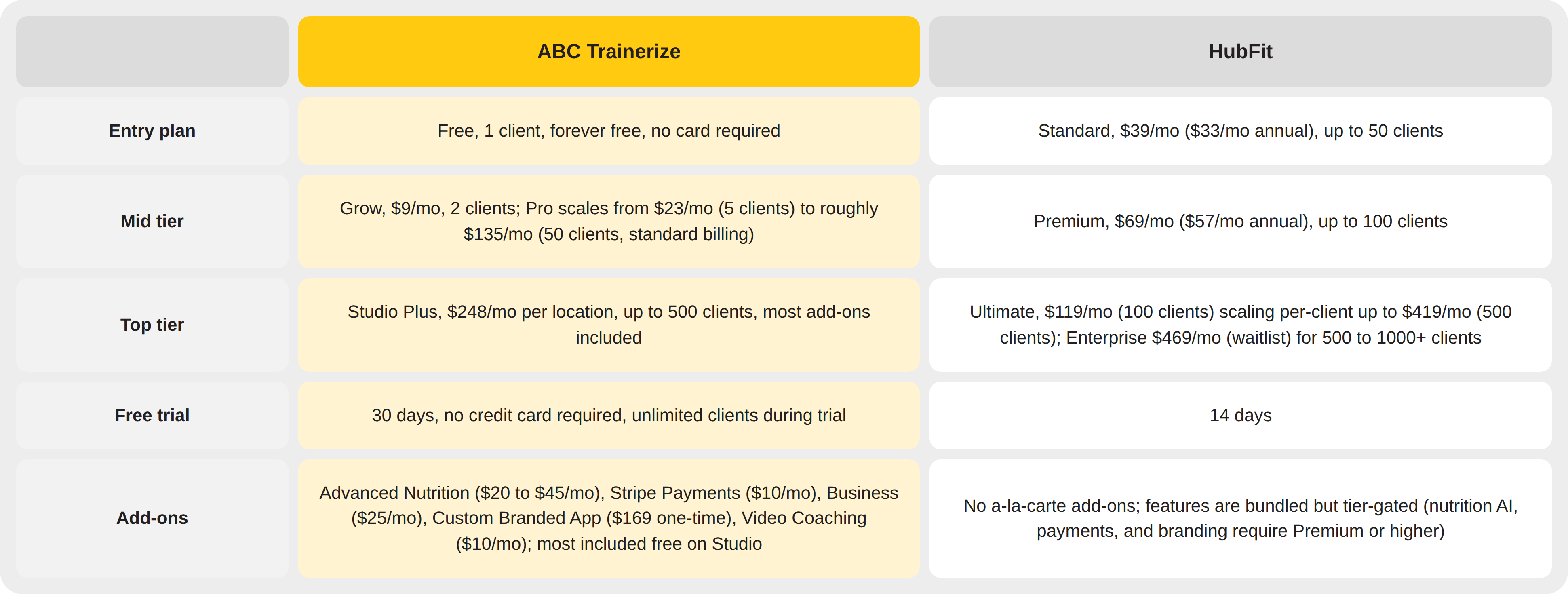
An honest analysis: HubFit’s flat, tier-based pricing is simpler to budget against since there are no separate add-on charges. Trainerize’s modular pricing lets coaches pay only for the specific features they use, and its Studio Plus plan bundles nearly everything at once for larger operations.
Why Personal Trainers Choose ABC Trainerize
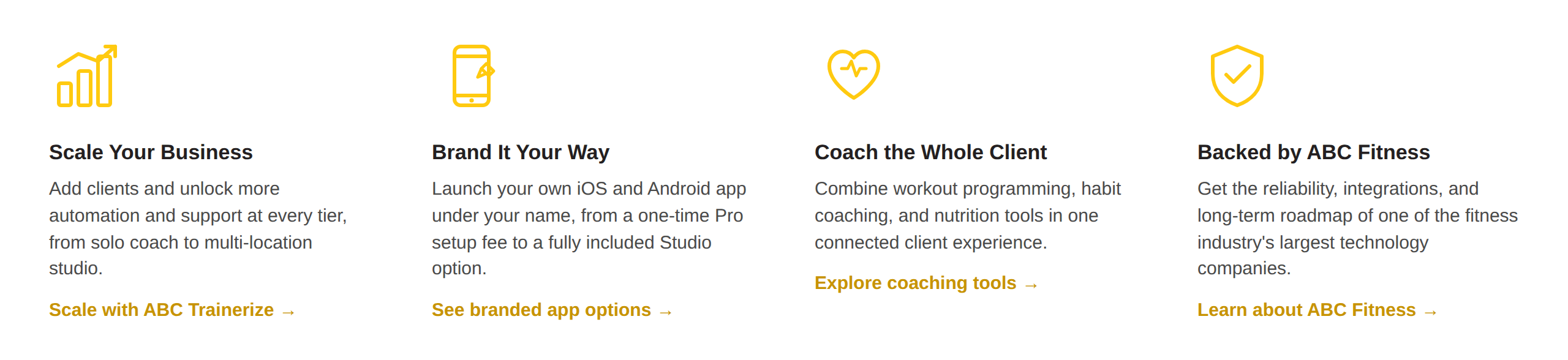
When it comes down to it, the choice between ABC Trainerize and HubFit often reflects two different priorities: depth and scale versus simplicity and bundled pricing. Trainerize has spent over a decade building out the ecosystem, integrations, and infrastructure that come with that depth. Here’s what that looks like for coaches who choose it:
Ready to Choose the Right Platform?
See why 400,000+ fitness professionals trust ABC Trainerize
Start your free trial today with unlimited clients. No credit card required.
Frequently Asked Questions
What is the main difference between Trainerize and HubFit?
ABC Trainerize is the mature, ecosystem-scale platform, trusted by 400,000+ trainers and fitness businesses worldwide, while HubFit is a newer platform built around bundled, tier-based pricing for around 50,000+ coaches. Trainerize offers deeper native integrations and a standalone branded app option. HubFit trades some of that depth for a simpler, more transparent pricing structure.
Is HubFit easier to use than Trainerize?
HubFit’s modern, dashboard-first design is a genuine strength that reviewers consistently praise. Trainerize backs its slightly larger feature set with live masterclasses, on-demand webinars, and detailed help center documentation, so new coaches have structured support while learning the platform’s full depth.
Does Trainerize include nutrition coaching?
Yes, basic nutrition and macro tracking is included on Trainerize’s paid plans starting at $9/month. The Smart Meal Planner, which generates full meal plans and recipes, is a separate add-on priced at $20 to $45 a month depending on your plan tier.
Can I switch from HubFit to Trainerize?
Yes, Trainerize offers a free trial with no credit card required, so you can test the switch risk-free. Client programs, nutrition plans, and habit templates typically need to be rebuilt manually, since there is no confirmed direct HubFit import tool.
How much does Trainerize cost compared to HubFit?
Trainerize starts free for 1 client or $9/month for 2 clients on Grow. HubFit starts at $39/month for up to 50 clients on its Standard plan. Trainerize is modular, so your total cost depends on which add-ons you enable, while HubFit bundles more into each flat tier but gates several features behind Premium or Ultimate.
Which platform is better for scaling a fitness business?
ABC Trainerize is the stronger choice for coaches planning to scale. It combines a broader native integration list, studio and enterprise plan options, and a standalone branded app, backed by infrastructure built for larger fitness businesses over more than a decade.
Still Comparing Trainerize and Hubfit?
400,000+ trainers trust ABC Trainerize
See why 400,000+ personal trainers trust ABC Trainerize to coach clients, grow their business, and deliver an experience clients come back for.