
You didn’t become a personal trainer to spend your evenings chasing payments, sending reminders, or updating spreadsheets.
But here’s what happens when your coaching business starts growing: more clients mean more check-ins, more scheduling, more messages, and more administrative work.
Before you know it, you’re spending almost as much time managing your business as you are coaching.
Sound familiar?
The good news is that growing your client list doesn’t have to mean growing your workload at the same pace.
With the right personal training automation tools, you can take repetitive tasks off your plate, deliver a more consistent client experience, and free up time to focus on the work that actually needs you.
Let’s explore how.
How can I automate my work as a personal trainer?
To automate your personal training business, start by using coaching software to handle repetitive tasks like client onboarding, appointment scheduling, recurring payments, workout delivery, and check-in reminders.
You can also use AI-powered tools to streamline personalized feedback, monitor client engagement, and identify when clients need extra support.
Here are seven areas where automation can make the biggest difference:
| Task | What automation can do |
| Client onboarding | Deliver welcome messages, forms, and initial programs |
| Scheduling | Let prospects and clients book available appointments |
| Payments | Collect recurring payments and send billing reminders |
| Workout creation and delivery | Generate personalized workout drafts with AI and streamline program assignments |
| Client check-ins | Collect feedback and prepare AI-assisted responses |
| Progress monitoring | Track engagement and identify clients needing attention |
| Marketing and growth | Manage referrals, promotions, and business insights |
The goal isn’t to automate your relationship with clients. It’s to automate the repetitive work surrounding it.
How much time can personal trainers save with automation?
Think about all the small tasks you repeat throughout the week.
Five minutes here. Ten minutes there. A quick follow-up between sessions. Another reminder after dinner.
Individually, they don’t seem like much. Together, they can take up a significant portion of your schedule.
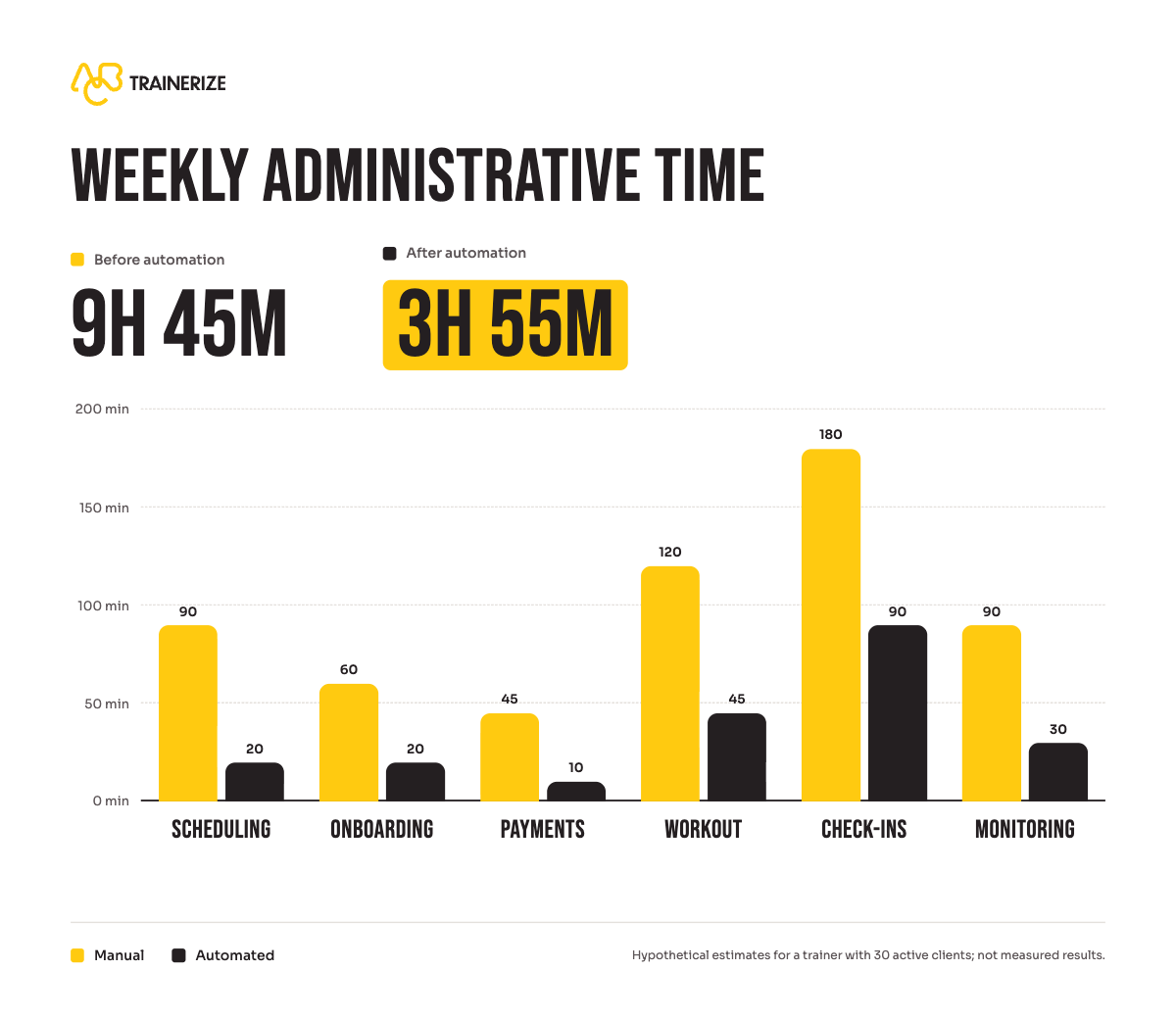
Consider this hypothetical example of a personal trainer managing 30 active clients.
A week in the life of a personal trainer: Before vs. after automation
| Weekly task | Manual workflow | With automation |
| Scheduling and booking | 90 min | 20 min |
| Onboarding new clients | 60 min | 20 min |
| Payment administration | 45 min | 10 min |
| Workout and resource delivery | 120 min | 45 min |
| Preparing client check-in responses | 180 min | 90 min |
| Reviewing client engagement | 90 min | 30 min |
| Total | 9h 45m | 3h 55m |
That’s a potential 5 hours and 50 minutes back in a single week.
Over four weeks, that’s more than 23 hours you could spend coaching clients, developing new programs, growing your business, or simply enjoying your time outside work.
Of course, your actual savings will depend on your client roster, workflows, and the tools you use. These figures are illustrative estimates, not measured ABC Trainerize results or guaranteed outcomes.
But they demonstrate an important point: automation doesn’t have to eliminate a task entirely to make a meaningful difference.
Sometimes, cutting a 10-minute task down to three minutes is enough to transform your week.
Now, let’s look at how to make that happen.
7 ways to automate your personal training business
1. Automate client onboarding for a smoother first impression
Every new client needs guidance. They need to understand how your coaching works, share their goals, and know what to do next.
But manually sending the same welcome messages, forms, and instructions can quickly become exhausting.
What you can automate:
- Welcome messages and onboarding instructions.
- Intake forms and questionnaires.
- Initial workout and habit assignments.
- Follow-up reminders and resources.
Example: Build an automated onboarding journey
Imagine a client has just purchased your 12-week coaching program.
Instead of manually coordinating every step, you can create a workflow that welcomes them, provides onboarding instructions, delivers their initial resources, and helps them get started.
With ABC Trainerize’s Business Add-on, Automated Client Journeys let you automatically assign workouts, habits, and resources to new clients.
And with FitMetrics, you can create more responsive workflows based on events such as new intake forms, program progress, and client engagement.
The benefit: Every client gets a consistent, professional onboarding experience, while you spend less time repeating administrative tasks.
2. Automate scheduling and make it easier for clients to book
“Are you free Tuesday?”
“Actually, can we do Thursday?”
“What about next week?”
If this sounds like your inbox, it’s time to automate your scheduling.
Whether you’re offering in-person training, virtual consultations, or hybrid coaching, managing appointments shouldn’t require endless back-and-forth messages.
What you can automate:
- Prospect consultation bookings.
- Appointment scheduling.
- Availability management.
- Booking-related administrative work.
Example: Let prospects book directly with you
Instead of coordinating availability through messages, share a booking link that allows prospects to schedule a consultation.
With the ABC Trainerize Business Add-on, you can create a custom booking page, manage your availability, and let clients schedule appointments and classes through the app.
The benefit: Less time coordinating calendars, fewer barriers for potential clients, and a more professional booking experience.
3. Automate payments and stop chasing invoices
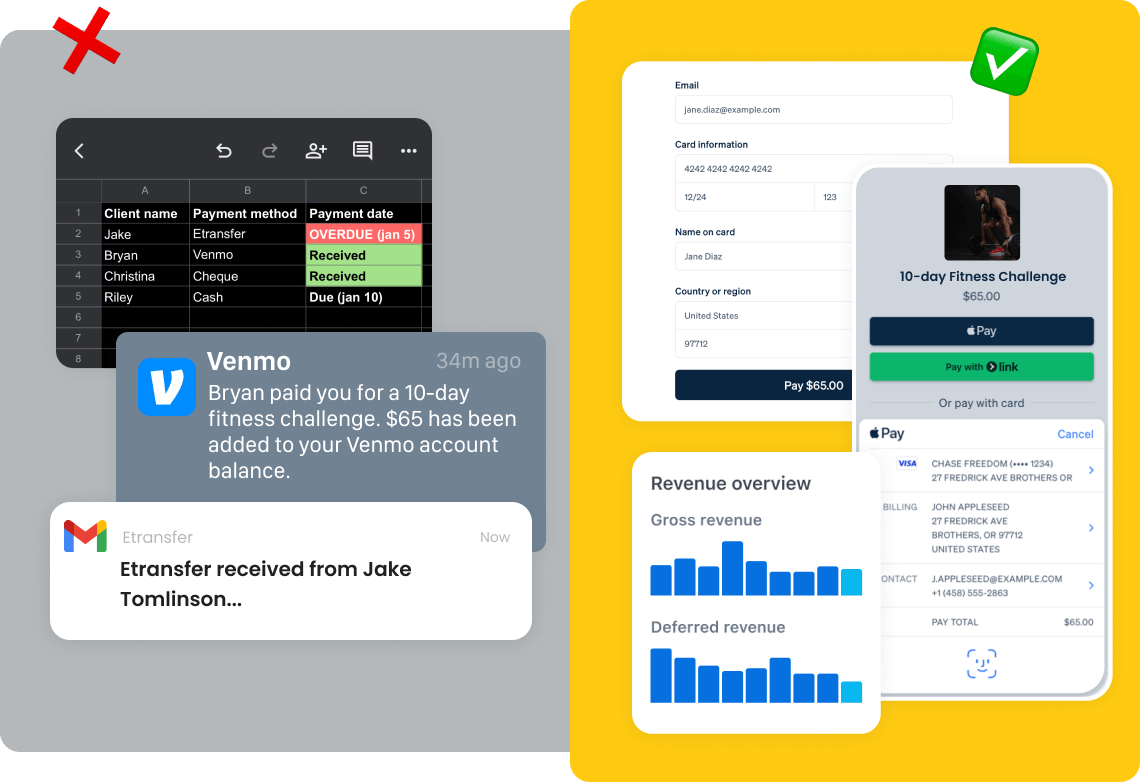
If you’re manually requesting payments, tracking overdue invoices, or managing multiple payment methods, billing can easily become one of the most frustrating parts of running your business.
The solution? Make payments part of your automated workflow.
What you can automate:
- Recurring membership payments.
- Payment collection.
- Billing reminders.
- Payment status monitoring.
Example: Set up recurring coaching memberships
Imagine offering a monthly coaching membership.
Instead of requesting payment every month, you can use recurring billing to create a more predictable payment experience.
With ABC Trainerize and Stripe Integrated Payments, you can sell memberships, recurring coaching services, and session packages.
Stripe can also send automated payment reminders, reducing the need for manual follow-ups.
The benefit: Less administrative work, a smoother payment experience for clients, and more time to focus on delivering your services.
4. Use AI to build workouts faster and automate program delivery
Creating personalized workouts takes time. And when you’re managing dozens of clients, building every session from scratch can quickly become one of the most time-consuming parts of your week.
But what if you could cut down the time spent creating workouts without sacrificing personalization?
With AI-powered tools, you can speed up workout creation while keeping your coaching expertise at the center of every program.
What you can streamline:
- Creating personalized workout drafts with AI.
- Adjusting exercises, sets, reps, and progressions.
- Saving workouts for future use.
- Automating routine workout, habit, and resource delivery.
Example: Create personalized workouts in minutes with AI
Let’s say you’re building a strength workout for a client who has specific goals, training preferences, and previous workout history.
Instead of starting from scratch, you can use the ABC Trainerize AI Workout Builder to generate a workout based on your instructions and relevant client data.
Here’s how it works:
- Describe the workout: Enter your own prompt or choose from suggested prompts. The tool can also use relevant client information and training history.
- Review and personalize: AI generates a workout draft that you can refine by adjusting exercises, sets, reps, or progressions.
- Save and deliver: Confirm the workout, save it to your library, and assign it to your client using ABC Trainerize.
The AI Workout Builder helps coaches create workouts up to 50% faster, freeing up more time to focus on the decisions that truly require their expertise.
And the time savings don’t have to stop at workout creation.
With the Business Add-on, you can also use Automated Client Journeys to deliver workouts, habits, and resources as part of a structured coaching experience.
The benefit: Spend less time creating workouts and managing repetitive assignments, while continuing to deliver training experiences tailored to your clients.

5. Use AI to make client check-ins faster and more meaningful
Check-ins are one of the most valuable parts of coaching.
They help you understand how clients are feeling, celebrate their wins, identify challenges, and make informed adjustments to their programs.
But when you’re managing dozens of clients, reviewing data and writing individual responses can become a major time commitment.
That’s where AI-powered coaching automation can help.
Example: Generate personalized check-in drafts with FitMetrics
With FitMetrics, coaches can automatically generate check-in response drafts based on each client’s actual data.
Instead of starting from a blank message, you get a personalized draft informed by their activity and progress.
You review it, make adjustments, and decide what to send.
That means you can spend less time writing repetitive feedback and more time understanding what each client needs.
For example, imagine a client has been struggling to complete their workouts.
Rather than manually gathering their activity data before responding, you can use AI-assisted insights to help prepare a more relevant check-in.
The benefit: Faster feedback without turning your coaching into generic, automated messages.
And importantly, you remain in control of what your clients receive.
6. Automate progress monitoring and catch disengagement earlier
Here’s something that becomes increasingly difficult as your coaching business grows: keeping track of every client’s engagement.
One client stops logging workouts. Another misses a few check-ins. Someone else hasn’t been following their habits consistently.
When you’re managing a small roster, you might notice these changes immediately.
But what happens when you’re coaching 30, 50, or even 100 clients?
Manually reviewing every profile isn’t always realistic.
Example: Turn client activity into actionable insights
FitMetrics helps you monitor client status and compliance across your roster, making it easier to identify clients who may need attention.
Instead of opening every profile individually, you can get a clearer view of engagement and progress.
You can also create workflows that respond to client actions, program progress, or engagement levels.
For example:
Trigger: A client’s engagement drops.
Automated workflow: A follow-up action is initiated based on your configured rules.
Coach action: You review the client’s situation and provide personalized support.
This is where automation becomes more than a time-saving tool.
It helps you move from reactive coaching to proactive coaching.
The benefit: You can identify potential disengagement earlier and intervene before it becomes a bigger problem.
7. Automate business growth, not just administrative work
Most personal trainers think about automation as a way to save time.
But what if it could also help you grow?
With the right systems, you can streamline the activities that bring new clients into your business, promote your services, and support long-term retention.
What you can automate:
- Client referral programs.
- Promotional announcements.
- Trial offers and prospect management.
- Business performance monitoring.
Example: Turn happy clients into new business opportunities
Imagine one of your clients is getting fantastic results.
Instead of hoping they’ll recommend you to a friend, you can create a structured referral program that makes sharing your services easier.
With the ABC Trainerize Business Add-on, you can set up client referrals, promote programs through in-app announcements, and offer trials to prospective clients.
You can also use the Business Dashboard to monitor important metrics such as conversions, sales, billing, and churn.
The benefit: You can spend less time managing individual growth activities and more time building a sustainable coaching business.
How to start automating your personal training business in 5 steps
You don’t need to automate everything overnight.
In fact, the best approach is usually to start with one repetitive task, make sure the workflow works, and expand from there.
Step 1: Identify your biggest time drains
Track your administrative work for one week.
How much time are you spending on scheduling, payments, check-ins, onboarding, and client follow-ups?
Look for tasks that happen repeatedly and don’t require your personal expertise every time.
Step 2: Prioritize the easiest wins
Start with repetitive, predictable activities.
For many trainers, scheduling, recurring payments, and onboarding are practical first steps.
Once those workflows are running smoothly, you can explore more advanced automation.
Step 3: Choose tools that work together
Using five disconnected tools can sometimes create more work than it saves.
Look for coaching software that connects your client management, workout delivery, communication, payments, and reporting.
The fewer systems you have to manage manually, the easier it becomes to build efficient workflows.
Step 4: Test your first automation
Start with one workflow, such as new-client onboarding.
Test it from the client’s perspective.
Are the instructions clear? Is the right information delivered? Does the experience still feel personal?
Make adjustments before rolling it out more broadly.
Step 5: Measure the results
Automation isn’t something you set up once and forget.
Monitor whether it’s actually improving your business.
Track metrics such as:
- Time spent on administrative work.
- Client onboarding completion.
- Check-in completion rates.
- Client engagement and retention.
- Lead-to-client conversion.
- Revenue and recurring payments.
Use those insights to improve your workflows and identify your next automation opportunity.
What should personal trainers NOT automate?
Just because something can be automated doesn’t mean it should be.
Your expertise, judgment, and relationships are what make your coaching valuable.
Some interactions deserve your full attention.
| Great for automation | Keep the human touch |
| Appointment scheduling | Sensitive client conversations |
| Payment reminders | Individual coaching decisions |
| Routine program delivery | Exercise modifications and injury-related concerns |
| Check-in collection | Personalized encouragement and support |
| Engagement monitoring | Understanding the reasons behind client struggles |
The best automation strategy doesn’t make your coaching less personal.
It creates more room for the moments that matter.
How ABC Trainerize helps you automate your coaching business
You don’t need a complicated collection of disconnected tools to start automating your business.
With ABC Trainerize, you can manage coaching delivery, client communication, and business operations in one platform, then extend those capabilities with tools designed to help you work more efficiently.
| Solution | How it supports automation |
| ABC Trainerize | Manage clients, workouts, habits, and coaching communication |
| AI Workout Builder | Create personalized workout drafts faster using AI and client data |
| Business Add-on | Simplify scheduling, payments, referrals, promotions, and automated client journeys |
| FitMetrics | Add AI-assisted check-ins, engagement insights, and responsive client workflows |
The Business Add-on helps streamline the operational side of your business, while FitMetrics adds AI-powered capabilities to help you manage coaching delivery and client engagement at scale.
FitMetrics is available as an add-on for paid ABC Trainerize plans. The Business Add-on can be purchased separately on Grow and Pro plans and is included in Studio plans.
Together, these tools can help you spend less time managing repetitive tasks and more time delivering great coaching.
Frequently asked questions about personal training automation
Can I automate my personal training business?
Yes. Personal trainers can automate repetitive tasks such as onboarding, scheduling, payments, workout delivery, reminders, and progress monitoring. Coaching software can help manage these workflows while allowing trainers to focus on personalized client support.
What is the best automation tool for personal trainers?
The best tool depends on your business needs. Look for personal training software that combines client management, workout delivery, communication, payments, and automation capabilities. ABC Trainerize offers these capabilities through its core platform, Business Add-on, AI Workout Builder and FitMetrics.
How much time can personal trainers save with automation?
Time savings depend on the size of your client roster and the tasks you automate. For example, a hypothetical trainer managing 30 clients could save several hours per week by streamlining scheduling, billing, check-ins, and progress monitoring. Tracking your time before and after implementation is the best way to measure your actual savings.
Can AI automate personal training?
AI can assist with workout creation, check-in responses, client data analysis, and other repetitive coaching tasks. However, trainers should continue reviewing AI-generated recommendations and making individualized coaching decisions.
Can AI create personalized workouts for my clients?
Yes. AI workout builders can help personal trainers generate workout drafts based on client goals, preferences, and training history. For example, the ABC Trainerize AI Workout Builder uses relevant client data to create personalized workouts that coaches can review, edit, and save. This helps reduce workout creation time while keeping trainers in control of programming decisions.
How can personal trainers automate client check-ins?
Personal trainers can use coaching software to collect check-in information, organize responses, and generate feedback drafts. With FitMetrics, coaches can use AI to draft personalized check-in responses based on client data, then review and adjust them before sending.
What’s the difference between automation and AI in personal training?
Traditional automation follows predefined rules, schedules, or triggers. AI-powered tools can also analyze information and generate context-aware content, such as personalized check-in drafts. Together, they can help trainers reduce repetitive work while maintaining a more individualized coaching experience.
Will automation make my coaching feel less personal?
Not when it’s implemented thoughtfully. Automate routine administrative tasks while keeping important coaching decisions, sensitive conversations, and relationship-building personal. The goal is to create more time for meaningful client interactions.
Less admin. More coaching. More room to grow.
Growing your personal training business shouldn’t mean spending every evening catching up on administrative work.
From onboarding and payments to AI-assisted check-ins and client engagement monitoring, automation can help you build a more efficient business without compromising the quality of your coaching.
And with ABC Trainerize, the Business Add-on, the AI Workout Builder and FitMetrics, you can bring those workflows together in one connected coaching ecosystem.
Because the best way to grow your coaching business isn’t always to work more hours. Sometimes, it’s to make the hours you already work count for more.
Start your free 30-day ABC Trainerize trial