

PTminder is shutting down on December 31, 2027. If you’re currently using the platform to manage your personal training business, it’s time to start thinking about what comes next.
Switching software probably wasn’t on your to-do list. After all, you’ve already built your workflows, organized your clients, and figured out how to keep your business running smoothly.
But here’s the good news: finding a PTminder alternative doesn’t have to mean starting from scratch. It could be an opportunity to simplify your operations, improve your client experience, and unlock new ways to grow your coaching business.
In this guide, we’ll explore what to look for in a PTminder replacement, compare PTminder with ABC Trainerize, and share practical tips to help you prepare for the transition.
Is PTminder shutting down?
Yes. PTminder is scheduled to discontinue its services on December 31, 2027, meaning coaches currently using the platform will need to find another solution to manage their clients and businesses.
If you’re one of them, there’s no need to rush into a decision. But there’s also no reason to wait until the last minute.
Moving to a new coaching platform involves more than creating an account. You’ll need time to evaluate your options, organize your client information, set up your services, and help clients get comfortable with their new app.
The sooner you start exploring alternatives, the more flexibility you’ll have to make the switch on your own terms.
What should you look for in a PTminder alternative?
The best PTminder replacement isn’t necessarily the one with the longest feature list. It’s the one that supports how you coach today while giving you room to grow tomorrow.
Before choosing your next personal training software, consider these five questions:
- Can it handle your everyday business operations?
From scheduling appointments to collecting payments and managing clients, your software should make running your business easier, not add another layer of admin.
- Does it support your coaching style?
Whether you train clients in person, online, or through a combination of both, look for a platform that makes it easy to deliver personalized workouts, nutrition guidance, and ongoing support.
- Will it help you keep clients engaged?
Great coaching doesn’t stop when a session ends. Features like messaging, habit tracking, progress monitoring, challenges and automated check-ins can help you stay connected with clients between appointments.
- Can it help you grow your business?
Think beyond your current client roster. Tools for attracting leads, generating referrals, selling coaching packages, and automating onboarding can make a real difference as your business expands.
- Will it grow with you?
Your needs today might look very different a year from now. Choosing flexible software that supports more clients, additional trainers, and new services can save you from having to switch platforms again.
ABC Trainerize vs. PTminder: How do they compare?
If you’re familiar with PTminder, you’ll be happy to know that ABC Trainerize offers many of the core capabilities you already rely on, including online training, nutrition planning, booking, payments, and mobile app branding.
But ABC Trainerize also brings additional tools to the table, especially when it comes to automation, client engagement, and business growth.
Here’s a quick look at how the two platforms compare.
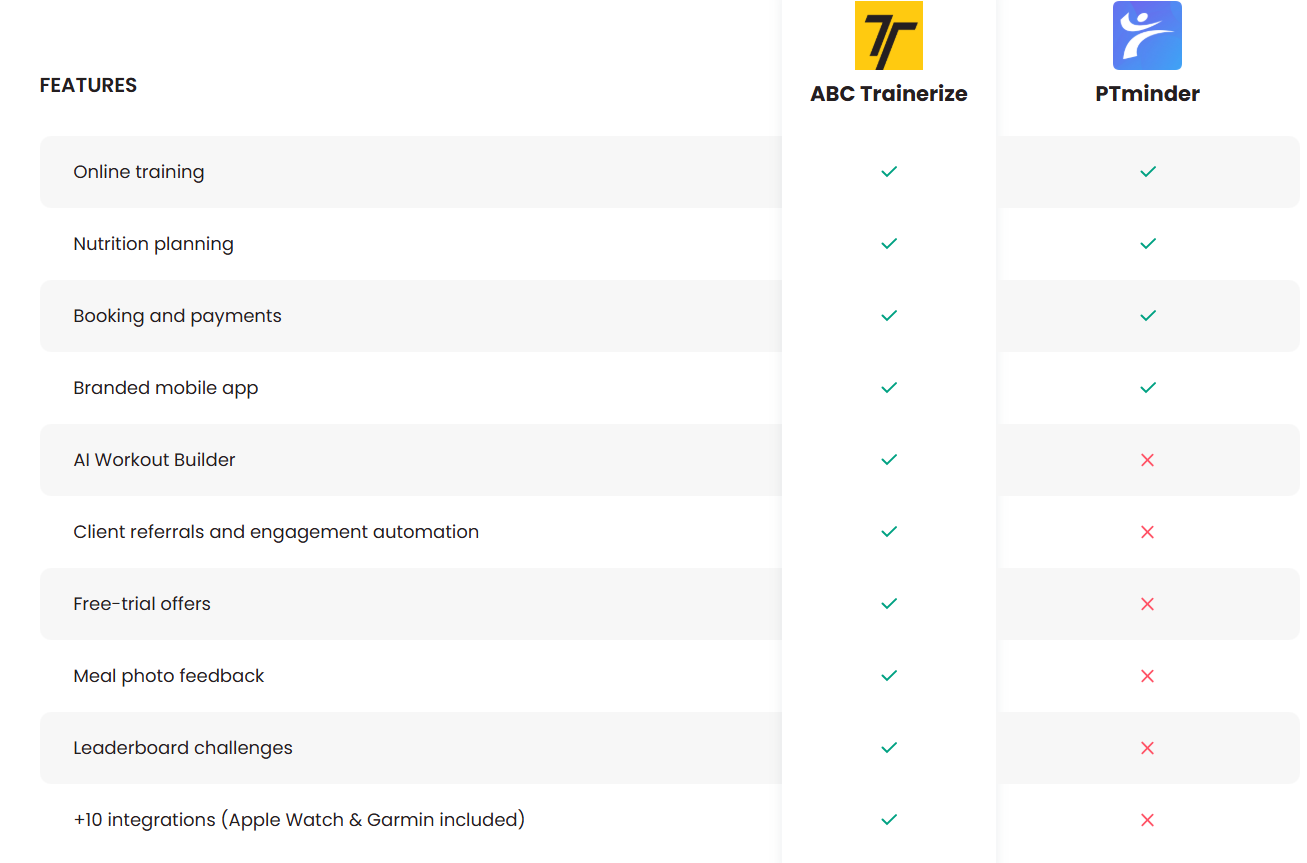
While both platforms support essential personal training operations, ABC Trainerize offers additional capabilities such as an AI Workout Builder, client referral tools, automated client journeys, meal photo feedback, leaderboard challenges, and integrations with popular fitness apps and wearables.
And these aren’t just extra features to check off a list. They’re tools designed to help you spend less time managing your business and more time growing it.
5 reasons to consider ABC Trainerize as your PTminder replacement
1. Keep your coaching and business operations in one place
Managing a personal training business means juggling a lot of moving parts.
You’ve got workouts to create, clients to support, appointments to schedule, and payments to collect. And when those tasks live across multiple tools, even simple processes can become unnecessarily complicated.
ABC Trainerize brings your coaching and business operations together in one platform.
You can create personalized training programs, deliver nutrition coaching, communicate with clients, schedule appointments, and sell your services without constantly switching between different systems.
With the Business Add-On, you can also manage prospect bookings, accept payments through Stripe, and automate parts of your client onboarding process.
Why it matters: Less time spent coordinating tools and handling admin means more time to focus on delivering great coaching experiences.
2. Build personalized workouts faster with AI
Creating effective training programs takes expertise. But building every workout from scratch? That takes time.
With the ABC Trainerize AI Workout Builder, you can generate structured workouts based on your clients’ goals and preferences, then review, customize, and refine them to match your coaching approach.
That means you can spend less time on repetitive program-building tasks while keeping the decisions that matter most in your hands.
Why it matters: As your client roster grows, you can deliver personalized programming more efficiently without sacrificing the quality of your coaching.
3. Turn happy clients into your next growth opportunity
Your existing clients can be one of your most powerful sources of new business.
But if you’re relying entirely on word of mouth, you might be missing opportunities to turn those recommendations into actual sign-ups.
With the ABC Trainerize Business Add-On, you can create a Client Referral Program that makes it easy for clients to recommend your services to friends and family.
You can also create trial offers to introduce prospective clients to your coaching, helping them experience the value of your services before committing to a longer-term program.
And with automated client journeys, you can streamline key communications throughout the client lifecycle.
Why it matters: Instead of relying on manual follow-ups and hoping referrals come your way, you can build more consistent processes for attracting and converting new clients.
4. Keep clients engaged beyond their workouts
Your clients’ progress isn’t determined only by what happens during their training sessions.
Consistency, nutrition, daily habits, and motivation all play a role. And keeping clients engaged between sessions can be just as important as delivering a great workout.
ABC Trainerize gives you tools to support the entire coaching journey.
You can:
- Review meal photos and provide personalized nutrition feedback.
- Create habit goals that encourage consistency outside the gym.
- Launch leaderboard challenges to build motivation and a sense of community.
- Track progress and communicate with clients directly in the app.
- Connect with popular fitness apps and wearables, including Apple Watch and Garmin, to gain more visibility into client activity.
Why it matters: When clients feel supported and connected to their coach throughout the week, you have more opportunities to build accountability, demonstrate your value, and strengthen long-term relationships.
5. Build a coaching business that’s ready for what’s next
Maybe you’re currently focused on one-on-one sessions. But what if you decide to offer online coaching? Launch a hybrid membership? Bring another trainer onto your team?
Your software shouldn’t hold you back.
ABC Trainerize supports in-person, online, and hybrid coaching models, with plans designed for independent trainers, growing coaching businesses, and larger studios.
You can also take your branding further with a Custom Branded App, giving clients a coaching experience that reflects your business.
And as your needs evolve, you can expand your setup with additional business tools, nutrition coaching capabilities, and integrations.
Why it matters: Instead of choosing software that only solves today’s problems, you can invest in a platform designed to support your next stage of growth.
How to switch from PTminder to ABC Trainerize
Changing platforms might sound overwhelming, especially when you’ve got an active client roster to manage.
But with a little planning, you can make the transition much more manageable.
Here’s a practical approach to getting started.
Step 1: Take inventory of your current setup
Before making any changes, list the features and workflows you currently use in PTminder.
Think about your client records, appointments, workout templates, nutrition plans, packages, and payment arrangements.
Identify what’s essential to your day-to-day operations and what you’d like to improve with your next platform.
Step 2: Back up your important information
Review PTminder’s available data export options and save copies of the information you’ll need to keep your business running.
This might include client contact details, training history, upcoming appointments, outstanding package balances, and financial records.
Make sure you understand what information can be transferred directly and what may need to be recreated manually.
Step 3: Explore ABC Trainerize with a free trial
You don’t need to commit to a new platform before seeing how it works.
With ABC Trainerize’s 30-day free trial, you can explore the platform, create workouts, test coaching features, and get familiar with the client experience.
No credit card required.
Use this time to evaluate how the platform fits your coaching style and business needs.
Step 4: Set up your coaching services and workflows
Once you’re comfortable with the platform, start rebuilding the essentials.
Create your training programs, configure appointments, set up your coaching products, and explore the automation features that could make your day-to-day operations easier.
This is also a great opportunity to rethink processes that weren’t working particularly well before.
Step 5: Introduce your clients to their new coaching experience
Your clients don’t need to know every technical detail behind the switch. They just need to understand what’s changing, when it’s happening, and how it benefits them.
Explain how they’ll access their workouts, track progress, communicate with you, and manage their sessions.
Consider starting with a small group of clients before moving everyone over.
And don’t forget to coordinate recurring payments and bookings carefully to avoid missed sessions or duplicate charges.
Step 6: Give yourself time to adjust
You don’t have to figure everything out overnight.
ABC Trainerize offers educational resources, tutorials, and live masterclasses to help you get familiar with the platform and make the most of its features.
The goal isn’t just to move your business from one platform to another. It’s to build a setup that works better for you and your clients.
Frequently asked questions about PTminder alternatives
When is PTminder shutting down?
PTminder is scheduled to discontinue its services on December 31, 2027. If you’re currently using the platform, it’s a good idea to start exploring alternatives and planning your transition ahead of that date.
What is the best alternative to PTminder?
The best alternative depends on your business needs, coaching style, and budget. ABC Trainerize is worth considering if you’re looking for an all-in-one platform that combines workout programming, nutrition coaching, client engagement, scheduling, payments, and business growth tools.
Can I use ABC Trainerize for in-person personal training?
Yes! ABC Trainerize supports in-person, online, and hybrid coaching. You can use it to manage your in-person clients, schedule appointments, track their progress, and provide additional support between sessions.
Does ABC Trainerize offer the same features as PTminder?
ABC Trainerize supports many of the core functions available in PTminder, including online training, nutrition planning, booking, payments, and mobile app branding. It also offers additional features such as AI-powered workout building, client referrals, engagement automation, and wearable integrations. Feature availability depends on your selected plan and add-ons.
Can I transfer my clients from PTminder to ABC Trainerize?
You can add your clients to ABC Trainerize and invite them to use the app. However, the ability to transfer specific records or historical data depends on the export options available in PTminder and the supported import methods in ABC Trainerize. Review these requirements before starting your migration.
Does ABC Trainerize offer a free trial?
Yes! ABC Trainerize offers a 30-day free trial with no credit card required, so you can explore the platform and see how it fits your coaching business before choosing a paid plan.
Your next chapter deserves more than a replacement
Having to change your coaching software might not have been part of your plan for 2027.
But it doesn’t have to be a setback.
The right platform can help you keep everything you love about your current coaching setup while opening the door to new opportunities: more efficient workflows, stronger client relationships, and a business that’s easier to grow.
With ABC Trainerize, you get more than a place to manage workouts and appointments. You get the tools to deliver personalized coaching, streamline everyday operations, and build a business that’s ready for whatever comes next.
PTminder may be closing, but your coaching business is just getting started.
Ready to explore your next coaching platform?
Start your 30-day free trial of ABC Trainerize
No credit card required.