

The best scheduling app for fitness depends on what you’re trying to fix.
If you’re tired of texting clients back and forth to find a time, simple booking software with self-booking and automated reminders will fix it. If you want booking tied to your coaching and payments, you need one platform that handles all three. And if you’ve hired a second trainer or started running small-group sessions, you’ll also need team features like staff permissions and a shared schedule.
Below, you’ll learn what to look for in scheduling software for personal training businesses, see the top options side by side, and find out how to switch without losing a booking. The tools we compare are ABC Trainerize, Acuity Scheduling, Calendly, My PT Hub, and Square Appointments.
Key Takeaways
- The best scheduling app for fitness handles the basics automatically: client self-booking, automated booking reminders, and payment at the point of booking.
- Standalone scheduling apps fix booking while integrated platforms connect booking, coaching, and payments in one place.
- If admin is eating into your coaching time, or no-shows are costing you revenue, you’ve outgrown free tools and basic calendar apps.
- Once you add a second trainer or small-group sessions, look for role-based staff permissions, clear client assignment, and 1:1 and group sessions in one tool.
When a Personal Calendar App Stops Being Enough
Most trainers start with a generic calendar app, like Google Calendar or the one on their phone. It works until you’re texting clients to find a time, chasing no-shows, and tracking who’s paid somewhere else. That’s usually the first sign you need real scheduling software.
The second sign comes as you grow. With only 15% of fitness trainers and instructors being self-employed, most already work inside some kind of team. If you’re scaling a personal training business, you’ll hit the same wall the day you start hiring additional trainers.
Once you add trainers, the first thing to break is usually availability. Each trainer’s hours live in a different place, so clients get double-booked. Next comes ownership. Nobody’s sure which client belongs to which trainer, or who should see their payments. Then group sessions end up in a spreadsheet, completely outside your booking tool.
This guide is written for personal trainers who want clients to book, pay, and show up without the back-and-forth. If you’ve started building a team, or you mix 1:1 clients with semi-private training sessions, we’ll also flag the team features to look for in each tool, so you pick one you won’t outgrow.
What to Look for in Personal Trainer Scheduling Software
In 2026, personal trainers need scheduling software with session packages, cancellation policies, and client progress all in the same workflow.
- Client self-booking portal: Your clients should be able to book without texting you. A portal lets them pick a session type, choose an open slot, and confirm on their own. That alone saves hours of back-and-forth each week.
- Automated session reminders: No-shows are expensive. The right software should send automated reminders before each session, like a nudge 24 hours out.
- Cancellation policy enforcement: Set policies reduce no-shows even further. Look for software that lets you set a cancellation cutoff and decide what happens when someone cancels late, whether that’s a fee or a used session credit.
- Session packages and recurring bookings: If you sell session packs or run weekly check-ins, your scheduling software should track how many sessions your client has left. It should also repeat weekly bookings without you re-entering them.
- Two-way calendar sync: Your availability should sync in real time with Google, Apple, or Outlook. Ideally, your personal events also flow back in and block those times from being booked.
- Payment gateway integration: The best scheduling tools process session payments and package purchases at the point of booking, not after.
If you’re running a team, also look for:
- Role-based staff permissions: Each trainer should only see and manage their own clients, while owners, admins, and managers get wider access.
- Clear client assignment: Each client should have one trainer, and you should be able to reassign them without rebuilding their bookings.
- Mixed session types: Keep 1:1 and small-group sessions in one tool, each with its own booking rules and capacity. Splitting them across two tools is how double-bookings happen.
- Self-booking that respects each trainer’s hours: Client self-booking only works on a team if clients see each trainer’s real availability. Good trainer availability management stops a client from booking Sam’s slot on Sam’s day off.
- Booking and payments together: With a bigger roster, taking payment at booking saves you from more manual invoicing.
Read more: Creating an Effective Personal Trainer Schedule
Personal Trainer Scheduling Software at a Glance
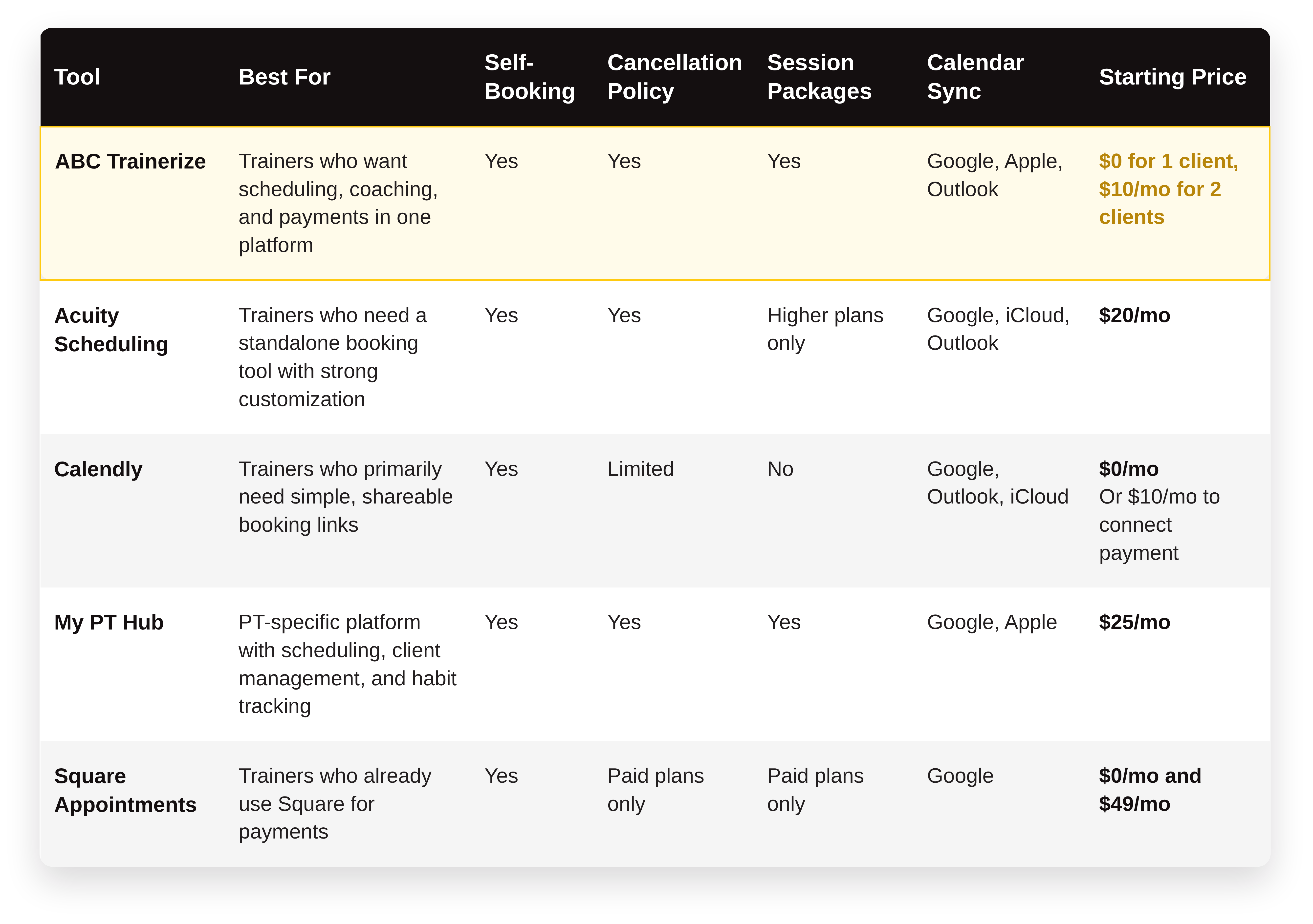
Here’s how the top tools stack up on the features that matter most for personal trainers:
What You Should Know About This List
Not every tool here does the same job. They fall into two groups:
- Scheduling apps (Acuity, Calendly, Square Appointments) handle booking, reminders, and payments. Your programs, progress tracking, and client messages still live somewhere else.
- Personal training software (ABC Trainerize, My PT Hub) puts scheduling in the same place as your workouts, nutrition, and client progress.
All five take payments, and all have a mobile app for you. Only two have an app for your clients: ABC Trainerize and My PT Hub. With the rest, clients book through a web link.
If you want clients to book, train, and message you in one place, start with the second group.
The Best Scheduling Apps for Fitness
Not sure how to choose the right scheduling app? We’ve got you covered with this list of tried-and-true options:
1. ABC Trainerize
ABC Trainerize is the #1 fitness scheduling app to better engage your clients and fuel your business growth. So, take your coaching online and deliver an experience like nothing your clients have ever seen before!
Key features:
- Integrated payments and scheduling to easily sell your services
- Flexible training options: online, in-person, or hybrid
- In-app messaging, progress tracking, and habit coaching to keep clients on track
- Fully branded workout planner app for a consistent client experience
- Google Calendar Sync gives clients the most accurate view of the best available times to book appointments.
- Five staff roles (Owner, Admin, Manager, Shared Trainer, Regular Trainer), so you control exactly who can book and manage which clients, and at which location. Multi-trainer scheduling is available on paid plans, not just the top tier.
Supported payment systems: Stripe (an add-on on paid plans, included in Studio plans and the Business Add-On).
Supported calendars: Google Calendar, Apple Calendar, and Outlook. Appointments sync out to the calendar you choose, and Google Calendar events also sync in to block your availability.
Pricing: ABC Trainerize offers a free 30-day trial (no credit card required). Paid plans start at $10 USD per month for independent trainers, with additional pricing tiers based on your fitness biz’s size. After the trial, you can also stay on the free plan with one client.
2. Acuity Scheduling
Acuity Scheduling streamlines your booking process and enhances the client experience. For example, its easy client scheduling, secure payments, and workflow automation simplify appointment management so you can focus on what you do best: inspiring and motivating your clients.
Key features:
- Customizable booking pages with real-time availability
- Ability to set specific time slots, recurring appointments, and virtual appointments
- Seamless multi-location management
- Automated appointment reminders and notifications to reduce no-shows
- Multiple staff calendars on one account: up to 6 on the Standard plan and 36 on Premium
Supported payment systems: Stripe, Square, and PayPal. It also offers features like storing credit cards and options for prepayment, tipping, and deposits.
Supported calendars: Google Calendar, iCloud, Office 365, and Outlook.
Pricing: Acuity offers a 7-day free trial, but no free plan. Paid plans start at $20 USD per month ($16 billed annually) and include core features like payment processing, email reminders, and custom client forms.
3. Calendly
Calendly eliminates the back-and-forth to find the perfect training time! For example, their seamless appointment booking and helpful integrations streamline the scheduling process for you and your team.
Key features:
- Share availability and let clients easily book appointments on your calendar
- Brand your booking pages with your logo, colours, and FAQs
- Schedule or make changes on-the-go from your mobile device
- Easily book group events like classes, webinars, or team meetings
Supported payment systems: Stripe and PayPal (paid plans only).
Supported calendars: Google Calendar, Office 365, Outlook, and iCloud.
Pricing: Calendly offers a free plan with no-frills scheduling features. Paid plans start at $10 USD per user per month and include additional capabilities like automated notifications, multiple calendars, and greater customization.
The Teams plan ($16 per seat per month) adds round-robin distribution and admin controls. It’s built for sales and consulting teams sharing meetings, though, not for assigning clients to trainers.
4. My PT Hub
My PT Hub is built specifically for personal trainers, making it a different kind of tool from the generic scheduling platforms on this list.
Beyond a basic booking calendar, it combines client management, habit tracking, and nutrition coaching alongside appointment scheduling.
Key features:
- Booking calendar with client self-scheduling
- Client profiles with session history and progress tracking in one place
- Habit and nutrition tracking alongside workout delivery
- Automated reminders and booking confirmations
- White-label options for independent trainers who want branded client-facing tools
Supported payment systems: Stripe.
Supported calendars: Google Calendar, Apple Calendar.
Pricing: Plans start at $25 USD per month (the entry plan is capped at 3 clients) with payment processing, 1-to-1 bookings, and habit coaching features.
5. Square Appointments
Square Appointments is the flexible scheduling sidekick you need for your coaching business. Simplify your operations and ditch the back-and-forth so you can focus on helping your clients crush their fitness goals!
Key features:
- Mobile app for on-the-go scheduling
- Built-in point of sale (POS) to easily capture payments
- Automated reminders to reduce no-shows
- Ability to easily set up recurring appointments and class bookings
Supported payment systems: Square’s own system, which accepts all major credit cards.
Supported calendars: Google Calendar (all plans).
Pricing: Square offers a free plan that includes all basic features for a single location, including unlimited staff calendars. You can upgrade to a paid plan starting at $49 USD per month to access premium features like multi-staff appointment booking. That makes Square strong for high appointment volume, but it has no coaching features beyond booking and payments.
Everfit and TrueCoach: What About Team Features?
If you’re comparing coaching platforms on team features specifically, two more names come up.
Everfit’s Pro and Studio plans include a genuine “Manage Team Members” feature, plus booking and scheduling. It’s a real option if you want your team and your coaching delivery in one place.
🔎 You can see how it stacks up in our Everfit alternatives breakdown.
TrueCoach’s pricing page lists no team or multi-coach features on any plan. Its plans are built around one coach and their clients. If you’re about to hire, factor that in.
Why Personal Trainers Choose ABC Trainerize for Scheduling
Standalone scheduling tools solve your booking problem. But they create a new one: your scheduling lives in one app, your coaching in another, and your payments somewhere else.
That’s the core difference with ABC Trainerize:
- Scheduling connected to coaching: When a client buys a package in ABC Trainerize, their onboarding runs automatically. Their program gets delivered, their intake form goes out, and their first workout is waiting before you’ve even said hello.
- Business Add-On features: You can create booking pages so new leads can book directly from your Trainerize.me profile. You also get shareable booking links to drop into emails or DMs. And it’s all managed via a built-in CRM.
- Calendar sync: ABC Trainerize sends your appointments to Google Calendar, Apple Calendar, or Outlook, so your schedule shows up wherever you already check it.
- Built for a growing team: Five staff roles let you decide exactly who can book, edit, and view which clients. Your team calendar for personal trainers lives in the same platform as their programs, nutrition, and habit coaching, so there’s no need to switch between tools.
Alloy, a small-group training franchise, uses ABC Trainerize across its clubs to keep every coach and client connected. Here’s how owner Rick Mayo describes the difference:
“As soon as we implemented the Trainerize app within our clubs, it allowed all of our coaches to communicate with all of our clients and all of our other trainers, which means we were providing a consistent customer experience.” Rick Mayo, Owner, Alloy
If you’re comparing options, take a look at this breakdown of the:
- 🥇Best Personal Trainer Apps [2026]
- 👑Why Personal Training Software Is a Must-Have for Your PT Business
1:1, Small-Group, or Both? Match the Tool to How You Actually Train
Say you run 1:1 sessions Monday to Thursday, plus a Saturday small-group session for four clients.
A basic booking tool treats every slot the same way, and that causes two problems. It has no capacity limit, so a fifth client can book your group of four. And it can’t tell a group slot from a 1:1 slot, so clients end up booking the wrong one.
A fitness appointment scheduling app that handles both fixes this. In ABC Trainerize, 1:1 sessions and group training sessions are set up as separate appointment types, each with its own rules. For a group, you set the cap that fits your space, up to 49 clients plus the trainer.
1:1 sessions stay with each client’s assigned trainer. Group sessions are open for any client to book. With recurring session booking, your Saturday regulars keep their spot every week without rebooking.
One note: this section is about coach-led small-group and semi-private training sessions, not a drop-in class model. If you sell public classes to walk-ins, that’s a different business model with different software needs.
Switching Scheduling Tools Without Losing Bookings or Clients
Picked a tool? Here’s how to move over without dropping a session.
- Export before you import: Pull your client list and upcoming bookings from your current tool as a CSV.
- Run both for a short overlap: Keep your old tool live for one to two weeks. Once the last old booking has passed, switch it off.
- Tell clients directly: Send a short message explaining what’s changing, when, and how to book from now on.
Before you switch, check two things. First, your payment processing has to keep running without a gap, so set up and test payments in the new tool before you move anyone. Second, make sure it supports the session mix you already run. If you do 1:1 and small-group today, the new tool needs both on day one.
Turn on automated booking reminders in the new tool from the start, too. Each client gets a confirmation from the new system for their first booking, which cuts down on confusion.
Scheduling Made Simple by ABC Trainerize! Watch Our Crash Course on Appointments & Calendars: Scheduling Made Simple
Frequently Asked Questions
1. What is the best scheduling software for personal trainers?
The best choice depends on what you’re trying to fix. If you only need to stop the back-and-forth of manual booking, a standalone tool like Acuity Scheduling does the job well. If you want scheduling connected to coaching, payments, and client communication in one place, ABC Trainerize is the stronger option.
If you have more than one trainer, look for role-based permissions and team scheduling built in. ABC Trainerize gives you five staff roles and multi-trainer scheduling on paid plans.
2. How does scheduling software reduce no-shows for personal trainers?
Scheduling software reduces no-shows by sending clients automatic reminders before each session. It also lets you set a cancellation cutoff, so clients who cancel late or don’t show up lose the session.
3. Can personal training clients book their own sessions online?
Yes. Most personal trainer scheduling software, like ABC Trainerize, includes a client self-booking portal where clients can select a session type, choose an available time slot, and confirm payment in a single flow.
4. Is free scheduling software good enough for personal trainers?
Free plans work when you’re just starting out and only need basic appointment booking. Once you’re selling packages, taking payments, or adding a second trainer, you’ll need a paid plan.
5. What’s the difference between a scheduling app and personal training software?
A scheduling app handles booking, reminders, and calendar management. Personal training software includes scheduling as one part of a bigger system that also covers workout programming, client progress tracking, habit coaching, and in-app communication.
6. Can I assign the same client to more than one trainer?
ABC Trainerize assigns each client to one trainer, which keeps ownership clear. Owners, admins, and managers can still manage clients across the team. When several coaches work with one client, you can add them all to a group chat.
7. What’s the difference between scheduling software for a gym and for a personal training business?
Gym and studio software is built around public classes. Scheduling software for personal training businesses is built around the coach-client relationship. That means who trains whom, 1:1 and small-group sessions. But it also includes staff scheduling software that controls which trainer sees which clients. If you coach people rather than sell classes, you want the second kind.
8. Do I need different software once I start running group or semi-private sessions?
Not if your tool supports both session types. Look for separate booking rules and a capacity cap for group slots, so a 1:1 client can’t land in your semi-private session by accident. ABC Trainerize handles 1:1 and group appointments in the same schedule.
Get More Client Bookings with ABC Trainerize
Choosing the best scheduling app for your fitness business is an investment in your long-term growth. Additionally, it drives operational efficiency and sends client satisfaction sky-high!
Whether you’re coaching solo or adding your first trainer, ABC Trainerize puts booking, coaching, and payments in one place, so your schedule grows with your business. Start for free today.